Another Day for Mort
Help Mort solve this common computing conundrum...
It's early on a Monday morning and our hero, Mort Visibasicus, is about to do some typing when he should, instead, be programming.
He's already written this rather boring and repetitive chunk of code, which populates controls based on local variables:
txtFirstName.Text = _FirstName
txtLastName.Text = _LastName
cboTitle.SelectedValue = _Title
txtAddressLine1.Text = _AddressLine1
txtAddressLine2.Text = _AddressLine2
txtAddressLine3.Text = _AddressLine3
(and so on for twenty controls...)
Now, Mort needs to write the complementary code.
Mort needs to write code that will read from the controls to populate local variables.
He needs code like this:
_FirstName = txtFirstName.Text
_LastName = txtLastName.Text
_Title = cboTitle.SelectedValue
_AddressLine1 = txtAddressLine1.Text
_AddressLine2 = txtAddressLine2.Text
_AddressLine3 = txtAddressLine3.Text
(and so on... twenty times)
Mort refuses to do all that typing. He considers using cut and paste... maybe block selecting.... perhaps a regular expression, or Excel... but no... still too laborious, too methodical.
Screw this, Mort shakes his fist at the sky. I don't enact algorithms. I write them.
Mort considers the pattern he is after... it is just the same thing, but switched around, back to front... he thinks.
His eyes glaze over. He has one of those all-too-rare Mort Epiphanies.
He cranks up his friend -- the world's 2nd simplest code generator.
He sets the column delimiter to the equals sign "="

He turns on the option to 'trim each field'.

He pastes the existing code into the 'Input box'
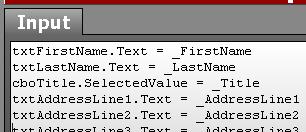
And he types in this pattern:
$2 = $1
Mort smashes the [calculate] button.... and Voila!
The desired code is created as if by digital magic.
Now while the geek in the next cubicle is still slaving over her hand-crafted, carefully typed code, Mort has finished his tasks for the day and can devote the remainder of his time chuckling away at the Daily Wtf.
Mort has discovered the essence of 'Micro Code-Generation'.
Laziness is its own reward.
Can you think of cleverer ways to use the world's 2nd simplest code generator?
(Note for C# programmers: set ";" as the row delimiter, and use the pattern: "$2 = $1;")
'Scott' on Fri, 29 Jul 2005 12:54:19 GMT, sez: Too...freakin...funny
'Brian Lounsberry' on Sun, 31 Jul 2005 14:48:07 GMT, sez: Or I guess there's always data-binding...
'Polar Bear' on Mon, 01 Aug 2005 08:38:47 GMT, sez: None of this tomfoolery would be necessary, of course, if you were using emacs. All you need to do is:-
1. Jump back to the beginning of the list of assignments:
<CTRL>-"r", "txtFir", <CTRL>-"a"
2. Duplicate the chunk of text between point and end:
<SHIFT><ALT>-".", <ALT>-"w", <CTRL>-"y",
3 Go back to the beginning of the duplicated text:
<CTRL>-"r", "txtFir", <CTRL>-"a"
4. Do a quick regexp search-and-replace:
<SHIFT><CTRL><ALT>-"5"
"^\(\ *\)\([^ =]*\) = \([^ =]*\)$"
<ENTER>
"\1\3 = \2"
<ENTER>
"!"
And there you are! How much easier could it be? And it only took me three tries to get the regexp right.
That's what I love about emacs ... everything you need is already at your fingertips. ;-)
'Peter' on Mon, 01 Aug 2005 22:10:00 GMT, sez: regexp in textpad (or visual studio .net)
In the find and replace dialog
Find what: \(.+\) = \(.+\);
Replace with: \2 = \1;
(In regular expressions "\(" and "\)" delimit the regular expression search string.
"." means any character, "+" means any number of characters. In the replace string "\1", "\2" etc. relate to the bracketed search expressions you have specified.)
'sg' on Tue, 02 Aug 2005 00:46:23 GMT, sez: Because of the weird nature of regular expression in Visual Studio, this doesn't quite work.
Try this
Find what: ^{[\t ]*}{.+}{ *}={ *}{.+}{ *};
Replace with: \1\5 = \2;
(and turn on the regular expression option...)
How ugly is that!
Only took twenty minutes to work out...
'Rik Hemsley' on Tue, 02 Aug 2005 17:06:57 GMT, sez: Let's try recording a Vim macro, because I like advertising how brilliant Vim is.
Start recording a macro called q
Go to start of line
Find '='
Delete next char ('=')
Delete (and copy) to end of line
Go to start of line
Paste before the cursor
Append '='
Go back to command mode
Move down one line
Stop recording
Run the macro 'q' the number of times necessary to fix each line.
Here's what the actual key presses look like, if you're fixing 21 lines:
qq0/=<ret>xD0Pa=<esc>jq
20@q
Hardly any thinking involved, it's all interactive, and it took probably 10 seconds. I never save macros because I always use them for trivial manipulation like the above and it's easy to make them again.
'Mischa Kroon' on Thu, 04 Aug 2005 04:03:00 GMT, sez: I've made a mygeneration template to complement this code generator.
With this you can combine one of the most advanced code generators with your very simple code generator:
http://shrinkster.com/75t
'lb' on Thu, 04 Aug 2005 05:37:06 GMT, sez: Thanks Mischa! Good stuff...
This feature is currently slated for inclusion in the world's fifth or sixth simplest generator (which will be a window's forms app..)
|