What To (Really) Do If You Find Out Your Parents Are Using Vista (redux)
secretGeek .:dot Nuts about dot Net:.
home .: about .: sign up .: sitemap .: secretGeek RSS

What To (Really) Do If You Find Out Your Parents Are Using Vista (redux)

I probably owe Vista an apology for that previous slurring. I started out wanting to say something else altogether, but once that idea had occurred to me, I found it irresistable ;-)

So here's the real story: My Parents Bought Vista. Shocking, yes. But it's not the end of the world. I'm here to tell you there is Life On Vista.

Here are practical tips for how to deal with Parental Vista Use.

  1. Remove OEM Junk
  2. Good children don't let parents run as admin
  3. Set their hard drive free!
  4. A digital Camera without a backup strategy is a loaded handgun without a safety switch
  5. No Aero for You!

Remove OEM Junk

First thing to do is to identify any OEM crap that the vendor will have bundled on there. I had to delete a bunch of Compaq nonsense and then kill a trial-copy of Norton Anti Virus (NAV).

Norton Anti Virus: just say no.

If you want to run anti-virus software, you want AVG.

But also... maybe you noticed that Vista has a very heavy-handed security model of its own, nothing like the "run anything" hey day of windows in previous eras. So maybe it occurred to you that anti-virus software is not such a necessity on Vista as it was on previous Windows Operating Systems.

In a way, using anti-virus software and UAC (User Account Control) at the same time, reminds me of the old saw about the Irishman who wore two condoms: "to be sure, to be sure."

So I think you ought to choose: UAC or AVG.

But the dumbest choice is NAV plus UAC.

While you're at it, check for any unwanted startup programs (run "msconfig") and see what services are set to start automatically.

Good children don't let parents run as admin

Remember the crazy times back at the turn of the millennium? The default SA password for SQL Server was [blank] -- and every man and his hound ran as admin?

Those days are gone, Jack, and it's time to reel your parents in. They ain't admins. They are guests on their own machine and they will treat it with respect, dammit.

If they have software that demands they run as admin... you'll stick that b*tch in a VM and tell it to shut the hell up. Capisco?

Should they need to elevate to admin to install some software... they will beg for help, explain their crazy predicament, apologise for their tom-foolery, and you will vnc onto their machine (with Fog Creek CoPilot, TeamViewer or some other remote assistance tool) and do the necessary.

Set their hard drives free!

Two tips here:

  1. Turn off Indexing
  2. Enable advanced performance (on SATA drives)

Indexing is turned on by default... and it's a heavy tax your parents don't need. In some crazy scramble to catch up to google, and to make up for their past failures in hard drive searching, they want to bring your hard drive to its knees permanently, so that the one time you search for something, there will be a plethora of irrelevant results presented imeediately and without pause. Turn off indexing. Really. Your mother don't need it.

She doesn't even need indexing on her email. If she does have a big pst file that she wants to search, she will operate differently to you and I. She'll carefully craft her search, and then, while the search is running she'll make a nice hot cup of tea. Time is different for each generation.

If they have a SATA disk in their Vista machine... the setting Enable write caching on the disk is enabled by default on SATA disks in Windows Vista, but the second setting Enable advanced performance is not enabled by defaultEnable Advanced Performance
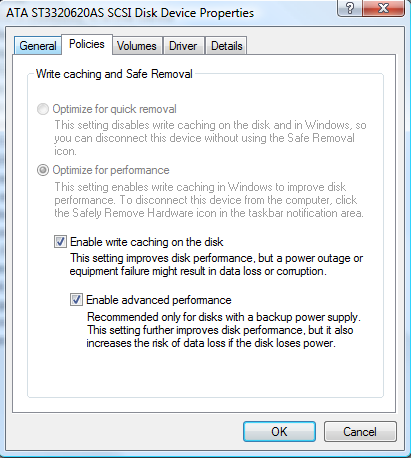
  1. Click Start, right-click on "Computer" and click "Manage" (you may get a UAC prompt here)
  2. Select "Device Manager", and expand the node for "Disk drives"
  3. Right-click on their primary hard drive, and select "Properties"
  4. Go to the "Policies" tab, and make sure "Enable write caching" on the disk and "Enable advanced performance" are both selected.
  5. Hit OK, close Computer Management

This can allegedly allow you to lose data if the power goes out suddenly. Yet some people have used it for years without incident. I consider it safe enough. You be the judge.

A Digital Camera without a backup strategy is a loaded handgun without a safety switch

Say it with me, say it loud:

A digital camera without a backup strategy is a loaded handgun without a safety switch

But what have digital cameras got to do with helping parents use Vista?

Because the same parents who go out and buy themselves Vista without understanding the repercussions are the exact kind of people who purchase a digital camera on a whim.

So generally a child who has one of these problems also has the other. I think.

So for this one, I urge you to read Scott Hanselman's excellent article, On Losing Data and a Family Backup Strategy.

No Aero Glass for You!

There's nothing for you to do in this step, just something to be aware of.

Vista Home Basic doesn't support the Vista Aero theme. Maybe you knew that already, but it had slipped by me, and I was baffled why it wasn't available, wasting time to trying to work out what was so bad about their machine that it didn't give Aero as an option.

Turned out that their hardware was plenty good enough. But the stingy buggers in the shop had pulled a swift one on the poor dears and given them the criminally downscale poor cousin of vista -- the Suburban Ghetto edition.

Apparently it's an easy registry tweak to get around -- but I haven't tried it as yet.

The history of why this version exists is a kind of unholy alliance between sellers of substandard hardware and mercenary-cannibals from the camels and rubber duckies sect of capitalism. There's a lawsuit in the US.

But I digress.

There is life after a Vista install.

You don't need to upgrade to XP.

And there are even some features of Vista I like. ([Alt]+[Up arrow] to move up a directory in explorer, amongst others)


'barryd' on Tue, 06 May 2008 13:49:42 GMT, sez:

The disk optimisation would be fine. If I could get it to persist over reboots. For some reason it never stays enabled for me; I blame intel and their weird sata drivers.


'Ben' on Tue, 06 May 2008 17:31:06 GMT, sez:

Nice!!! [Alt]+[Up arrow] is handy, but there is no way to do the same thing with the mouse.

XP had a single button for this and I didn't have to resort to the navigation pane.

[Alt]+[Up] is my new friend.


'Dom' on Tue, 06 May 2008 20:51:39 GMT, sez:

I can't see elderlies remembering alt-up, so it doesn't count as reason to *downgrade* to Vista. Maybe a post listing the compelling reasons to install Vista?


'lb' on Tue, 06 May 2008 22:05:51 GMT, sez:

@Dom - "compelling reasons to install Vista"

well I'm not really trying to push that particular cart. I'm not advocating installing it on an elderly person's current machine.

More like, coping with the fact that it's pre-installed on a newly purchased machine.

But on the positive side -- MS Paint has incorporated almost all the features I asked for in this post:
http://secretgeek.net/ZenOfPaint.asp

@Ben, re Alt-Up and "there is no way to do the same thing with the mouse"

Yep -- that's why I searched for a keyboard alternative. Unfortunately Alt-Up isn't supported in earlier versions of windows, so i'm often trying it in win 2003 or XP to no avail.


'Rice Crispie' on Wed, 07 May 2008 10:35:17 GMT, sez:

Great tips and rubbish joke about the Irishman!


'Mark Elder' on Wed, 07 May 2008 15:11:15 GMT, sez:

Try using the backspace key instead of ALT-UP. It's only one key and it does work on XP.


'merana' on Wed, 07 May 2008 16:07:30 GMT, sez:

I am toally pissed tha Vista does away with Jasc Paint Shop. As an artist, the crap HP Photo shop does less and does even that badly. Because of the lower (24) resolution, all my larger old Jasc files are being color converted to shink them down....software code obviouly written by a color-blind programmer.
Luckily I have access to an HP to convert them, but it has also FU'd the reading on my scanner.
*sigh*
slogan should be: "Vista, a major step BACKWARDS...all the crap you don't need or want, at half the speed"
And, this mom is NOT the type to wait patiently for ANYTHING.


'JimB' on Mon, 12 May 2008 18:58:03 GMT, sez:

I really can't see any compelling reason to let the 'rents turn off UAC. One the software they want is installed UAC should only pop up if they are doing something they shouldn't be doing without supervision. Same with indexing, it only runs when the 'rents aren't using it so why bother turning it off?


'Jon Galloway' on Thu, 15 May 2008 14:06:23 GMT, sez:

I think the best way to clear off the OEM junk is with PC Decrapifier (www.pcdecrapifier.com). It does a great job of finding all that useless bundleware that parents grow attached to if left unchecked.


name


website (optional)


enter the word:
 

comment (HTML not allowed)


All viewpoints welcome. But the right to delete any post for any reason is reserved. Don't make me do it. Aim for constructiveness. Comments may be republished, emailed to your loved ones or printed and used as toilet paper. Also, I get particularly nasty on comment spam. It's not worth even trying to post comment spam here -- your html is escaped, and your links are given a rel='nofollow'. By attempting to post a comment, you understand that if the comment is considered spam, at my absolute discretion, your IP address may be used as the target of a prolonged distributed denial of service attack. Your electricity might suddenly stop working. Your car tyres will go mysteriously flat. You will suffer permanent hairloss. Your dreams will be filled with terrifying monsters. And in any case I reserve the right to record and publish your IP address.


TimeSnapper is a life analysis system that stores and plays-back your computer use. It makes timesheet recording a breeze, helps you recover lost work and shows you how to sharpen your act.


NimbleText - FREE text manipulation and data extraction

NimbleText is a Powerful FREE Tool

Use it for:

  • extracting data from text
  • manipulating text
  • generating code

It makes you look awesome. Use it right now! Go on! Hurry! Don't walk, run!


Articles

Mind-boggling Demo of New Gaming Genre, aka Folder-Based Hangman, aka Fun with Recursion Mind-boggling Demo of New Gaming Genre, aka Folder-Based Hangman, aka Fun with Recursion
Got CSV in your javascript? Use agnes. Got CSV in your javascript? Use agnes.
I went to write down a book name and founded an internet empire instead. I went to write down a book name and founded an internet empire instead.
NimbleText: Origins NimbleText: Origins
The Windows 8 Mullet The Windows 8 Mullet
Cosby: spontaneous striped background generator Cosby: spontaneous striped background generator
Slides from WDCNZ: Live Coding Asp.net MVC3 Slides from WDCNZ: Live Coding Asp.net MVC3
MVC 3, MVC 3, "Third Times a Charm" references
Custom Errors in ASP.Net MVC: It couldn't be simpler, right? Custom Errors in ASP.Net MVC: It couldn't be simpler, right?
Anatomy of a Domain Hijacking, part 2: The Website Who Came In From The Cold Anatomy of a Domain Hijacking, part 2: The Website Who Came In From The Cold
Anatomy of a Domain Hijacking, part 1 Anatomy of a Domain Hijacking, part 1
secretGeek.net domain has been stolen. The site may go down. secretGeek.net domain has been stolen. The site may go down.
Boring article: 'untrusted domain' issue with SQL Server. Boring article: 'untrusted domain' issue with SQL Server.
Coding While You Commute Coding While You Commute
Test Driven Dentistry Is A Good Thing Test Driven Dentistry Is A Good Thing
The 'less crashy' release of NimbleText The 'less crashy' release of NimbleText
Rethinking Toolbars in Visual Studio (or any IDE) Rethinking Toolbars in Visual Studio (or any IDE)
Where shall we have lunch? Where shall we have lunch?
Setting up email for your microIsv Setting up email for your microIsv
The NO Visual Studio movement: Compiling .net projects in Notepad++ The NO Visual Studio movement: Compiling .net projects in Notepad++
ZeroOne: the editor for programmers who think in binary ZeroOne: the editor for programmers who think in binary
Mercurial workflow for personal projects (with a .net bias) Mercurial workflow for personal projects (with a .net bias)
I see you're using vim. Let me fix that for you. I see you're using vim. Let me fix that for you.
The worst recruitment spam I've ever read The worst recruitment spam I've ever read
A thank you I forgot to say A thank you I forgot to say
My new product, NimbleText, is live My new product, NimbleText, is live
Grabbing the free songs of Jonathan Coulton (with Powershell) Grabbing the free songs of Jonathan Coulton (with Powershell)
Using NimbleSet to compare lists Using NimbleSet to compare lists
Wanted: Wiki Lists (dot org) Wanted: Wiki Lists (dot org)
DOS on Dope: The last MVC web framework you'll ever need DOS on Dope: The last MVC web framework you'll ever need
JSON Query Languages: 5 special purpose editors JSON Query Languages: 5 special purpose editors
What then, is b? What then, is b?
SQLike: A simple editor SQLike: A simple editor
Yet Another BizPlan Generator. Yet Another BizPlan Generator.
HOT GUIDS: A hot or not site for guids HOT GUIDS: A hot or not site for guids
How does life get better? One tiny hack at a time. How does life get better? One tiny hack at a time.
24 things to do, and 100 things *not* to do (yet) for building a MicroISV 24 things to do, and 100 things *not* to do (yet) for building a MicroISV
Venture capital won't kill Jeff Atwood, it will only make him Jeffer. Venture capital won't kill Jeff Atwood, it will only make him Jeffer.
A handy workflow image for newbie mercurial users A handy workflow image for newbie mercurial users
Fractal Feedback, a diversion into recreational programming Fractal Feedback, a diversion into recreational programming
Hump-Jumping: How the Education of Computer Science can be Saved, err, maybe. Hump-Jumping: How the Education of Computer Science can be Saved, err, maybe.
Suggested User Experience Improvements for DiffMerge Suggested User Experience Improvements for DiffMerge
SQL Style Extensions for C# SQL Style Extensions for C#
The Movie Hollywood (And My Wife) Doesn't Want You To See: Weekend at Jacko's The Movie Hollywood (And My Wife) Doesn't Want You To See: Weekend at Jacko's
Sysi: the ultimate administrators toolkit Sysi: the ultimate administrators toolkit

Archives .: secretGeek :: Complete Archives
TimeSnapper -- Automated Screenshot Journal TimeSnapper.com    
Version 3.3: true productivity boost

Next Action NextAction
Managing the top of your mind

NimbleText -- World's Simplest Code GeneratorNimbleText -- World's Simplest Code Generator, Text Manipulator, Data Extractor

25 steps for building a Micro-ISV 25 steps for building a Micro-ISV
3 minute guides -- babysteps in new technologies: powershell, JSON, watir, F# 3 Minute Guide Series
Universal Troubleshooting checklist Universal Troubleshooting Checklist
Top 10 SecretGeek articles Top 10 SecretGeek articles
ShinyPower (help with Powershell) ShinyPower
Now at CodePlex

Realtime CSS Editor, in a browser RealTime Online CSS Editor
Gradient Maker -- a tool for making background images that blend from one colour to another. Forget photoshop, this is the bomb. Gradient Maker


[powered by Google] 


How to be depressed How to be depressed
You are not inadequate.


Recommended Reading


the little schemer


The Best Software Writing I
The Business Of Software (Eric Sink)

Recommended blogs

Jeff Atwood
Joseph Cooney
Phil Haack
Scott Hanselman
Julia Lerman
Rhys Parry
Joel Pobar
Thomas White
OJ Reeves
Eric Sink

Aggregated Links

proggit
dzone
hacker news
dot net kicks

Human Link Machines

interesting finds
a continuous learner's weblog
arjan's world
weekly link post

LinkedIn profile
LogEnvy - event logs made sexy
Computer, Unlocked. A rapid computer customization resource
PC Smart Buys - Computer Hardware in Australia
 
home .: about .: sign up .: sitemap .: secretGeek RSS .: © Leon Bambrick 2006 .: privacy

home .: about .: sign up .: sitemap .: RSS .: © Leon Bambrick 2006 .: privacy