SQL Server Enterprise Manager Tip: Printing Diagrams
This is one of those simple tips you could overlook for years, as have I.
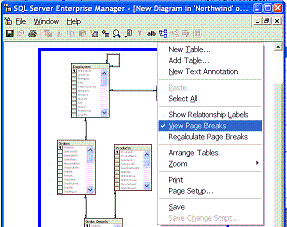
In Enterprise Manager, when you try to print database diagrams, the insane things always end up straddling multiple pages. It's a nightmare trying to get a nice simple print out.
It's so bad I'll often reverse-engineer a diagram into Visio, just so I have proper control over the printing.
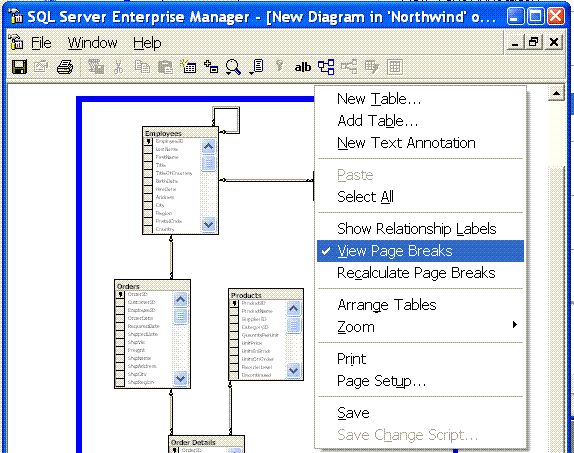
However, there is a solution.
Right-Click and select the option 'View Page Breaks'. Now you can rearrange your tables to avoid page breaks. And a neat print out is as easy as pie.
I'm kicking myself, wishing I'd noticed this sooner.
'Greg' on Mon, 07 Feb 2005 12:36:39 GMT, sez: I've only been using EM for about a billion years or so (well since its beta, but it feels like a billion years). And like you have disliked (hated?) its diagram printing.
sigh. The things you learn.
Thanks for posting this...
'Jerry Fletcher' on Fri, 11 Feb 2005 06:18:15 GMT, sez: This has been a great help!
'secretGeek' on Sat, 12 Feb 2005 03:14:06 GMT, sez: cheers Jerry
'SMedvid' on Tue, 22 Feb 2005 13:35:20 GMT, sez: Excellent Tip!
'Hollywood Jack' on Wed, 23 Feb 2005 23:52:16 GMT, sez: I was the first person in the world to discover this feature. I discovered it several years before SQL Server 1.0 was released.
By the way, anyone seen my Oscars website (click my name)?
'Bollywood Gupta' on Tue, 01 Mar 2005 05:12:39 GMT, sez: I showed Hollywood Jack that you can add your own custom columns to the SQL Server DB Diagram . For example, if you add comments about your database columns you can show that in the print out and give it to your DBA to wipe his butt with.
'ck' on Wed, 20 Apr 2005 13:04:11 GMT, sez: I wish I could know this earlier.
Thanks!
'Luciano Carou' on Tue, 14 Jun 2005 19:18:28 GMT, sez: A really great, great tip. Thanks a lot!!
'pyganesh' on Fri, 03 Feb 2006 12:44:05 GMT, sez: Really a great tip. Keep up the good work
'Chris' on Thu, 09 Feb 2006 11:23:09 GMT, sez: My god man, good eye! Funny how we can miss such an obvious detail!
'maddog' on Tue, 18 Apr 2006 23:56:41 GMT, sez: OMFG That feature has been there all along? I can't believe how much time and paper I've wasted not seeing that. Thanks for pointing it out!
'SQL Diagram Frustration Guy' on Fri, 19 May 2006 17:05:51 GMT, sez: Thanks! Amazing how easy it is to overlook this feature. What I would always hate is how you would drag your tables into the upper left hoping it would print better and they would just scoot back to where they were.
Any ideas on printing landscape?
'Matt DelGiudice' on Thu, 24 Aug 2006 10:43:07 GMT, sez: I found this entry on google and am glad I only had to deal with EM for a couple months before finding this out. Great tip, here's another: Use the page scale/zoom feature in page setup in conjunction with viewing page breaks; it will shrink you tables instead and help you fit tne entire thing on one page! Things are still very legible at 75%.
'Liam' on Fri, 17 Nov 2006 14:00:15 GMT, sez: Nice one Matt that is exactly what I needed
'sohaib' on Fri, 19 Jan 2007 18:23:52 GMT, sez: great tip...!
'Richard Parker' on Thu, 01 Feb 2007 20:07:05 GMT, sez: OMG - this is great!
Thank you!
'DB' on Fri, 09 Feb 2007 07:14:56 GMT, sez: Cheers great tip
'maumarza' on Tue, 06 Mar 2007 18:04:25 GMT, sez: wow what a tip!
'voldo' on Wed, 23 May 2007 13:04:11 GMT, sez: groundbreaking tip!
'mark' on Thu, 31 May 2007 16:13:29 GMT, sez: nice!!! thanks for sharing.
'Ryan' on Fri, 15 Jun 2007 11:13:09 GMT, sez: 'SQL Diagram Frustration Guy':
The landscape page setup option is accessed via the "Page Setup" item on the context menu. Just right-click on the diagram background (not on a table) and select "Page Setup".
Cheers
'John' on Fri, 15 Feb 2008 03:09:29 GMT, sez: Thank you very much! This was a wonderful tip!
'Scott' on Sun, 06 Apr 2008 15:12:12 GMT, sez: I've been using EM for years and have always ended taping together several pages!
This is a great help!
Cheers
'Germ' on Thu, 04 Sep 2008 09:17:10 GMT, sez: Simply awesome. You've made my day!
Thank you SO much.
Jim
'faisal younus' on Sat, 28 Feb 2009 09:37:44 GMT, sez: but how i can print those notes I worte for a specefic table.
'lb' on Sat, 28 Feb 2009 10:19:49 GMT, sez: @faisal
Here's a script i use for that...
select sc.name as 'Column', ep.value
from
syscolumns sc
inner join sysobjects so
on sc.id = so.id
left outer join sys.Extended_properties ep
on sc.colid = ep.minor_id
and so.id = ep.major_id
where
so.name = 'YOUR Table Name'
-- And to get these properties shown in the database schema viewer, you need to choose the custom view, and then add extended properties, description. I think.
'rasher' on Thu, 07 May 2009 06:17:07 GMT, sez: Thanks great tip!
'nat' on Thu, 28 May 2009 15:32:39 GMT, sez: another option on the table. copy to clipboard. paste to word or visio. then print. cheerios.
'telluric' on Fri, 18 Jun 2010 13:14:53 GMT, sez: Same story here, Visio etc.
Thanks much for the post!
'Adam Rochford' on Tue, 17 Aug 2010 22:12:51 GMT, sez: Even in SQL Management Studio 2008 it is exactly the same. I kept looking for a print preview but there is none. Page Breaking is pretty much the same thing though. Thanks for the tip.
'jonathan' on Thu, 02 Sep 2010 14:30:01 GMT, sez: I am using a plot like printer that can print large sized paper, such as 55x39 in (1.4 x 1 M).
'bimplebean' on Thu, 04 Nov 2010 06:32:44 GMT, sez: Well you just saved me all that pain; I fiddled with this for about ten minutes, wasted four sheets of paper, then found this via the google.
I thank you. The trees thank you. The planet thanks you. And my heart thanks you.<g>
'Lenny' on Sun, 17 Apr 2011 19:10:01 GMT, sez: you said it yourself. you could look for this for years, and 6 years after you posted this. IT IS STILL USEFULL!!! thanks a lot!!
|