 secretGeek.net
Sick Of Being Nagged to Restart, Every 10 Minutes After An Update?
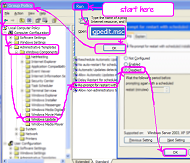
This is a tip that has been posted a lot of times before, but I've drawn a little picture to make it simpler.
First, here it is in words:
- Open the windows Run dialog
- type in "gpedit.msc" press ok -- this opens the "Group Policy" management Console
- Open "Local Computer Policy"
- Open "Computer Configuration"
- Open "Administrative Templates"
- Open "Windows Components"
- Open "Windows Update"
- Double click on "Re-prompt for restart with scheduled installations"
- Select "Disabled"
- Click "OK"
- Close the Group Policy management console
Here's the picture...

Note that in the help for this setting it wrongly says:
<wrong>"If the status is set to Disabled or Not Configured, the default interval is 10 minutes."</wrong>
('wrong' tags added for the benefit of people who are just skimming, i.e. most of us)
I've found that with the status set to disabled I never get nagged. So just do as I do, and it should be okay.
What I'd like would be a "configure notification" link directly on the nagging dialog box itself, that takes you to this part of the group policy. Provided you're allowed there, of course.
Here's some other posts talking about this topic:
- How to stop Windows Update nagging you to restart after an update
- XP Automatic Update Nagging (Coding Horror)
[yeh, I'm blogging this so i can find it next time I need it ;-) ]
Next → ← PreviousMy book "Choose Your First Product" is available now.
It gives you 4 easy steps to find and validate a humble product idea.