Don't make 'readonly' fields less readable

secretGeek .:dot Nuts about dot Net:.
home .: about .: sign up .: sitemap .: secretGeek RSS

Don't make 'readonly' fields less readable

Help me, Obama. You're my only hope.

There's a common UI anti-pattern of making "readonly" fields harder to read than editable fields.

I think this is a poor technique. I blame it on Windows Forms -- but I've seen it out there on the wild web as well.

If a control is readonly, then you should cater for the user actually wanting to read it. Shouldn't you?

Newspapers, for example are readonly. And they are commonly in black and white. Fine, crisp, perfectly legible black text. Not dull gray.

Rather than making the readonly fields dull gray, use some other form of visual hinting to differentiate between what can be edited and what can't.

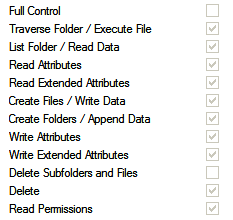
For example – here's some readonly checkboxes.

They are shown as dull gray with gray border.

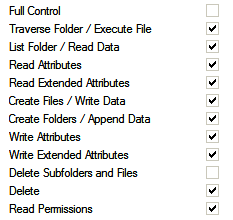
Instead, the check marks could be black, while only the control border is gray.
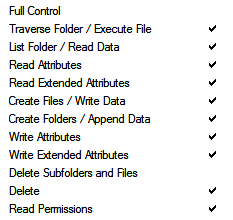
Or, perhaps the control border could disappear.
What about this drop down list – its 'readonly' status is indicated by gray text and gray border.

It gives the impression that it has no meaning and no influence. In fact, it's message is fairly important - perhaps extra important since the user has no control over it.

It could instead have black text and gray border.

How about black text with NO border. It's easy to read, and it's clearly not editable.

I think that both of these are preferable to the 'make it gray' approach. Don't you?

And finally, as a reward to those who "clicked through", here's a repeat from last time, since no-one mentioned it ;-)

It's not a tuna!

Got that? "Not a tuna!" Ha! That is genius. No, no. It is better than that. It is "genious."


'paul' on Thu, 22 Jan 2009 10:53:11 GMT, sez:

I like the "remove the borders" approach, very simple and clear.

Captcha: meatbag


'Mike Woodhouse' on Thu, 22 Jan 2009 11:20:55 GMT, sez:

Ahhhh.....heck. That's another fine website redesign you've gotten me into, Stanley.


'Jon' on Thu, 22 Jan 2009 11:29:09 GMT, sez:

The problem with the "remove the border" approach is it can make the controls disappear altogether. Imagine that none of the checkboxes were checked in your list. Then, when they are read-only, the controls disappear completely. This might be confusing, or even distressing, to the user if they were expecting the controls to be there (we actually ran into this on a product I was working on).


'Kevin Berridge' on Thu, 22 Jan 2009 12:00:14 GMT, sez:

I definitely agree that making readonly fields are to read is stupid.

Making the border gray could work, but in the case of the check boxes it was a bit too subtle. I think the same would be true for a text box.

Removing the border completely doesn't really work for all kinds of practical reasons. For example, if you have a set of controls and some are editable and some are not, it will look visually stupid.

I'd love to make a different suggestion, but I'm afraid I don't really have one.


'Brian R' on Thu, 22 Jan 2009 13:25:15 GMT, sez:

I agree with your basic point, but I think the gray borders are too subtle. I can barely tell the difference while looking at it carefully. Would someone not looking carefully notice it? What about someone with poor eyesight?

Perhaps black text on a light gray background would work?


'Michael Wales' on Thu, 22 Jan 2009 14:28:04 GMT, sez:

Many times, at least in OS design, the control is marked as read-only because the user has no influence or even a need to know that information.

For example, Internet Explorer Security settings may be managed by a higher authority on your network. By graying out those fields, you allow the user to passively ignore the areas in which they have no say in the matter and simply focus on the settings they are allowed to change.

Of course, why show it to the user if it doesn't pertain to them, right? I guess there is a reasonable advantage in allowing a user to actually see a setting, even if they can't alter it (for example, when discussing an issue with Tech Support).


'Emad Ibrahim' on Thu, 22 Jan 2009 16:17:08 GMT, sez:

Excellent suggestion. It was one of those things that we just do out of habit without giving it too much thought.

It is good to once in a while do like you and think outside the box and question the conventions.


'Douglas' on Thu, 22 Jan 2009 16:31:58 GMT, sez:

It's interesting that you call these fields "read only", I've not heard that one before. The normal term is "enabled", eg form elements go "grey" when you disable them.

Using a disabled user-input form to display data seems very wrong to me.

> It gives the impression that it has no meaning and no influence.

This is perfectly correct, for a field which is disabled. A more modern approach would be to completely hide fields which are not appropriate. This helps avoid the apparent confusion you express in this article.

On the other hand, if the intent is to present a piece of text which cannot be changed, you are perfectly right, just go ahead and display it as a piece of text, free of other distracting decoration.

PS: Reset buttons on forms are also old-fashioned!


'Shaun Austin' on Thu, 22 Jan 2009 17:58:05 GMT, sez:

I'm with Douglas, I think you're confusing read-only with Disabled.


'lb' on Thu, 22 Jan 2009 21:19:58 GMT, sez:

@Shaun/@Douglas
>confusing read-only with Disabled

maybe, maybe not.

i could've made this a lot clearer, and talked about disabled.

I think people often disable controls when what they should be doing is swapping the control out and using a label.

If the message is "this content is irrelevant" then disable the control. (In the examples above the content is not irrelevant, so it shouldn't be shown in a disabled control)

If the message is "this content is relevant, but you don't have the ability to change it" -- then don't use a disabled control. Either use a label, or (if the control has good support for readonly mode) use readonly mode.


'Don2' on Fri, 23 Jan 2009 01:39:07 GMT, sez:

It's a salmon


'Alb' on Fri, 23 Jan 2009 13:38:21 GMT, sez:

I'm not sure just removing the borders or making them gray creates enough of a contrast with controls that are no disabled. To really illustrate your examples I think you need to show a form with many elements - some enabled, some disabled to demonstrate the contrast between them.


name


website (optional)


enter the word:
 

comment (HTML not allowed)


All viewpoints welcome. But the right to delete any post for any reason is reserved. Don't make me do it. Aim for constructiveness. Comments may be republished, emailed to your loved ones or printed and used as toilet paper. Also, I get particularly nasty on comment spam. It's not worth even trying to post comment spam here -- your html is escaped, and your links are given a rel='nofollow'. By attempting to post a comment, you understand that if the comment is considered spam, at my absolute discretion, your IP address may be used as the target of a prolonged distributed denial of service attack. Your electricity might suddenly stop working. Your car tyres will go mysteriously flat. You will suffer permanent hairloss. Your dreams will be filled with terrifying monsters. And in any case I reserve the right to record and publish your IP address.


TimeSnapper is a life analysis system that stores and plays-back your computer use. It makes timesheet recording a breeze, helps you recover lost work and shows you how to sharpen your act.


NimbleText - FREE text manipulation and data extraction

NimbleText is a Powerful FREE Tool

Use it for:

  • extracting data from text
  • manipulating text
  • generating code

It makes you look awesome. Use it right now! Go on! Hurry! Don't walk, run!


Articles

Mind-boggling Demo of New Gaming Genre, aka Folder-Based Hangman, aka Fun with Recursion Mind-boggling Demo of New Gaming Genre, aka Folder-Based Hangman, aka Fun with Recursion
Got CSV in your javascript? Use agnes. Got CSV in your javascript? Use agnes.
I went to write down a book name and founded an internet empire instead. I went to write down a book name and founded an internet empire instead.
NimbleText: Origins NimbleText: Origins
The Windows 8 Mullet The Windows 8 Mullet
Cosby: spontaneous striped background generator Cosby: spontaneous striped background generator
Slides from WDCNZ: Live Coding Asp.net MVC3 Slides from WDCNZ: Live Coding Asp.net MVC3
MVC 3, MVC 3, "Third Times a Charm" references
Custom Errors in ASP.Net MVC: It couldn't be simpler, right? Custom Errors in ASP.Net MVC: It couldn't be simpler, right?
Anatomy of a Domain Hijacking, part 2: The Website Who Came In From The Cold Anatomy of a Domain Hijacking, part 2: The Website Who Came In From The Cold
Anatomy of a Domain Hijacking, part 1 Anatomy of a Domain Hijacking, part 1
secretGeek.net domain has been stolen. The site may go down. secretGeek.net domain has been stolen. The site may go down.
Boring article: 'untrusted domain' issue with SQL Server. Boring article: 'untrusted domain' issue with SQL Server.
Coding While You Commute Coding While You Commute
Test Driven Dentistry Is A Good Thing Test Driven Dentistry Is A Good Thing
The 'less crashy' release of NimbleText The 'less crashy' release of NimbleText
Rethinking Toolbars in Visual Studio (or any IDE) Rethinking Toolbars in Visual Studio (or any IDE)
Where shall we have lunch? Where shall we have lunch?
Setting up email for your microIsv Setting up email for your microIsv
The NO Visual Studio movement: Compiling .net projects in Notepad++ The NO Visual Studio movement: Compiling .net projects in Notepad++
ZeroOne: the editor for programmers who think in binary ZeroOne: the editor for programmers who think in binary
Mercurial workflow for personal projects (with a .net bias) Mercurial workflow for personal projects (with a .net bias)
I see you're using vim. Let me fix that for you. I see you're using vim. Let me fix that for you.
The worst recruitment spam I've ever read The worst recruitment spam I've ever read
A thank you I forgot to say A thank you I forgot to say
My new product, NimbleText, is live My new product, NimbleText, is live
Grabbing the free songs of Jonathan Coulton (with Powershell) Grabbing the free songs of Jonathan Coulton (with Powershell)
Using NimbleSet to compare lists Using NimbleSet to compare lists
Wanted: Wiki Lists (dot org) Wanted: Wiki Lists (dot org)
DOS on Dope: The last MVC web framework you'll ever need DOS on Dope: The last MVC web framework you'll ever need
JSON Query Languages: 5 special purpose editors JSON Query Languages: 5 special purpose editors
What then, is b? What then, is b?
SQLike: A simple editor SQLike: A simple editor
Yet Another BizPlan Generator. Yet Another BizPlan Generator.
HOT GUIDS: A hot or not site for guids HOT GUIDS: A hot or not site for guids
How does life get better? One tiny hack at a time. How does life get better? One tiny hack at a time.
24 things to do, and 100 things *not* to do (yet) for building a MicroISV 24 things to do, and 100 things *not* to do (yet) for building a MicroISV
Venture capital won't kill Jeff Atwood, it will only make him Jeffer. Venture capital won't kill Jeff Atwood, it will only make him Jeffer.
A handy workflow image for newbie mercurial users A handy workflow image for newbie mercurial users
Fractal Feedback, a diversion into recreational programming Fractal Feedback, a diversion into recreational programming
Hump-Jumping: How the Education of Computer Science can be Saved, err, maybe. Hump-Jumping: How the Education of Computer Science can be Saved, err, maybe.
Suggested User Experience Improvements for DiffMerge Suggested User Experience Improvements for DiffMerge
SQL Style Extensions for C# SQL Style Extensions for C#
The Movie Hollywood (And My Wife) Doesn't Want You To See: Weekend at Jacko's The Movie Hollywood (And My Wife) Doesn't Want You To See: Weekend at Jacko's
Sysi: the ultimate administrators toolkit Sysi: the ultimate administrators toolkit

Archives .: secretGeek :: Complete Archives
TimeSnapper -- Automated Screenshot Journal TimeSnapper.com    
Version 3.3: true productivity boost

Next Action NextAction
Managing the top of your mind

NimbleText -- World's Simplest Code GeneratorNimbleText -- World's Simplest Code Generator, Text Manipulator, Data Extractor

25 steps for building a Micro-ISV 25 steps for building a Micro-ISV
3 minute guides -- babysteps in new technologies: powershell, JSON, watir, F# 3 Minute Guide Series
Universal Troubleshooting checklist Universal Troubleshooting Checklist
Top 10 SecretGeek articles Top 10 SecretGeek articles
ShinyPower (help with Powershell) ShinyPower
Now at CodePlex

Realtime CSS Editor, in a browser RealTime Online CSS Editor
Gradient Maker -- a tool for making background images that blend from one colour to another. Forget photoshop, this is the bomb. Gradient Maker


[powered by Google] 


How to be depressed How to be depressed
You are not inadequate.


Recommended Reading


the little schemer


The Best Software Writing I
The Business Of Software (Eric Sink)

Recommended blogs

Jeff Atwood
Joseph Cooney
Phil Haack
Scott Hanselman
Julia Lerman
Rhys Parry
Joel Pobar
Thomas White
OJ Reeves
Eric Sink

Aggregated Links

proggit
dzone
hacker news
dot net kicks

Human Link Machines

interesting finds
a continuous learner's weblog
arjan's world
weekly link post

LinkedIn profile
LogEnvy - event logs made sexy
Computer, Unlocked. A rapid computer customization resource
PC Smart Buys - Computer Hardware in Australia
 
home .: about .: sign up .: sitemap .: secretGeek RSS .: © Leon Bambrick 2006 .: privacy

home .: about .: sign up .: sitemap .: RSS .: © Leon Bambrick 2006 .: privacy