Today's HOT Dos Tip...
secretGeek .:dot Nuts about dot Net:.
home .: about .: sign up .: sitemap .: secretGeek RSS

Today's HOT Dos Tip...

Beat your face against a brick wall if you didn't know about this short-cut in the command prompt.
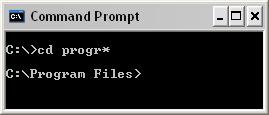
cd progr*

That's right honey. You can use wildcards, such as the '*', with the 'cd' command.

This is particularly useful with loooooong directory names and weird directory names.

Here's a CSS version of the graphic...

C:\>cd progr*

C:\Program Files>_

Every time another programmer spots me doing this they gasp in amazement, fall on the floor and begin to twitch. It's an embarrassment. Thanks to Edgar Smith for showing me this one, a few years back now...

...


'Jason' on Tue, 31 May 2005 10:47:14 GMT, sez:

Also, if you use PowerToys (or the appropriate reg hack) you can select a key (I use TAB) to autocomplete the file or folder name. It also cycles through possible matches. eg:

C:\>cd d(TAB)
C:\>cd dev(TAB again)
C:\>cd "Documents & Settings"(TAB again)
C:\>cd downloads(ENTER)
C:\downloads>_


'Matt Ranlett' on Tue, 31 May 2005 12:55:30 GMT, sez:

Not only is the ability to use wildcards nice, but the /d switch enables you to change drives as well, so you can start the command prompt and
c:\documents and settings\MyUser> cd /d i:\w*\n*\o*\ProgramDll1\s*
and end up at
i:\work\NextRelease\Objects\ProgramDll1\source>

very handy, especially when you want to copy the path from the Windows Explorer address bar and you don't have any power toys or registry hacks in place!


'David Stone' on Tue, 31 May 2005 14:26:29 GMT, sez:

That's interesting. I've never installed any PowerToys, yet the command prompt does tab autocomplete for me.


'secretGeek' on Tue, 31 May 2005 21:14:30 GMT, sez:

cheers jason, matt and david.

yep -- i haven't got any powertoys on this box, but tab does indeed do autocomplete, at least in XP .


'Dan F' on Tue, 31 May 2005 23:21:10 GMT, sez:

yowzers, nice tip!


'secretGeek' on Thu, 02 Jun 2005 21:17:56 GMT, sez:

Wow, this little tip was picked up by the excellent Julia Lerman. I hope she didn't slam her face too hard.

And Gaspar Torriero (http://www.gaspartorriero.it/blogger.html) says:

"Ho apena scoperto da Secret Geek che nella riga di comando è possibile usare il carattere jolly con cd.

Adesso vado a pestare la faccia contro un muro di mattoni."

Couldn't have put it better myself. I'm guessing that "faccia contro un muro" means "face with a wall" -- so he may also have done some damage there.

Where ever in the world you are: watch out for developers with broken noses.


'Yorai Aminov' on Fri, 24 Jun 2005 06:14:13 GMT, sez:

Tab autocomplete comes built in with Windows XP and 2003. You might have to enable it manually, though:

Start a command prompt, click on its icon to open the system menu, and select "Defaults". In the Properties dialog, select the "Options" tab, and check the "AutoComplete" checkbox, then click OK. New command prompt windows will then have tab autocomplete.


'Ben' on Fri, 24 Jun 2005 07:34:07 GMT, sez:

You can also drag the folder from the address bar in Windows Explorer into a command prompt window. You need to type "cd " first for it to be any use.


'craig' on Fri, 24 Jun 2005 16:30:54 GMT, sez:

The wildcards work the other direction as well:

c:\>cd *les
c:\Program Files>


'Robert' on Sun, 26 Jun 2005 01:58:14 GMT, sez:

Another handy batch file is to do something like this:

CD $1
CLS
ECHO $1
DIR /W
TYPE README.TXT

and save it in a PATH folder as "go.bat" or something, then use it like CD. It clears the screen, does a DIR summary and prints the readme file in the folder if there is one every time you open a folder. The variation on this that I use checks for the existance of a readme file first however.

The other batch file I use out of habit prints the errorlevel of the command at the prompt. IE:

ERRN MYPROG
Hello from MYPROG!
0
C:\>_

That's handy when writing command line programs that return useful error codes for debugging. If anyone wants the source for these let me know.

-Robert
robeddielee@hotmail.com


'Dave' on Sun, 26 Jun 2005 12:22:47 GMT, sez:

tcsh/ksh/bash, cygwin, anyone?


'mtVessel' on Thu, 30 Jun 2005 10:35:22 GMT, sez:

And for us Luddites who are still on Win2K, launching the console with the /f option turns file completion on, as in:

cmd /f:on

CTRL+D cycles through directory names, CTRL+F cyles through filenames, so:

C:\> cd doc //CTRL+D yields...
C:\> cd "Documents and Settings"


'Brian Lounsberry' on Wed, 27 Jul 2005 01:08:26 GMT, sez:

monad anyone?


'Gav' on Mon, 03 Oct 2005 19:05:22 GMT, sez:

Very nice thnks for the tips


'Arun' on Wed, 18 Jan 2006 07:39:48 GMT, sez:

'mtVessel' thank you for your information. it helps me a lot.

regards
arun


name


website (optional)


enter the word:
 

comment (HTML not allowed)


All viewpoints welcome. But the right to delete any post for any reason is reserved. Don't make me do it. Comments may be republished, emailed to your loved ones or printed and used as toilet paper. Who reads this legal bit anyhow?

TimeSnapper is a life analysis system that stores and plays-back your computer use. It makes timesheet recording a breeze, helps you recover lost work and shows you how to sharpen your act.

TimeSnapper won last year's Developer Competition at Larkware.com, and is used by over 10,000 people.

Articles

SQL Style Extensions for C# SQL Style Extensions for C#
The Movie Hollywood (And My Wife) Doesn't Want You To See: Weekend at Jacko's The Movie Hollywood (And My Wife) Doesn't Want You To See: Weekend at Jacko's
Sysi: the ultimate administrators toolkit Sysi: the ultimate administrators toolkit
Movie: Priest Academy Movie: Priest Academy
Inspirational Rat Story Inspirational Rat Story
A face-melting DSL that allows programming ON the iPhone (and iPad) A face-melting DSL that allows programming ON the iPhone (and iPad)
The secretGeek Disaster Recovery plan The secretGeek Disaster Recovery plan
Save KNVTn! Before it's too late Save KNVTn! Before it's too late
The Ultimate Agent of WERF Destruction The Ultimate Agent of WERF Destruction
The new prisoner's dilemma The new prisoner's dilemma
Original Premise for a road movie Original Premise for a road movie
What's a better game than Devshop? What's a better game than Devshop?
DevShop: The Cool Game that Makes Development Look Fun DevShop: The Cool Game that Makes Development Look Fun
Should be purple Should be purple
Kitchen Agile Kitchen Agile
Perhaps Perhaps "Go" is the new Visual Basic
zen-coding: turn those CSS selectors upside down zen-coding: turn those CSS selectors upside down
Debugging: It's all about finding Albuquerque. Debugging: It's all about finding Albuquerque.
The Real-Time online JQuery Editor The Real-Time online JQuery Editor
HTML5, a 3 minute guide HTML5, a 3 minute guide
Developer Codpieces Developer Codpieces
Agile for one: The Personal Story 'Wall' In Action Agile for one: The Personal Story 'Wall' In Action
Never work with thick people. Never work with thick people.
Cosmo: project status panel Cosmo: project status panel
Windows Search in Japan Windows Search in Japan
Project Management Zen Project Management Zen
Continuous Integration, Plugins and Going Too Far Continuous Integration, Plugins and Going Too Far
The Rules of Stand Up The Rules of Stand Up
Sydney International Airport: Stupid, Criminal, or Criminally Stupid? Sydney International Airport: Stupid, Criminal, or Criminally Stupid?
God No! ...The ReBuilder God No! ...The ReBuilder
Matt, The Office Mortar Matt, The Office Mortar
'Outlook style' rules for Subversion 'Outlook style' rules for Subversion
Really deep linking: Url + regex Really deep linking: Url + regex
hExcel -- A Hexagonal Spreadsheet hExcel -- A Hexagonal Spreadsheet
Is the remote control a thing of the past? Is the remote control a thing of the past?
The Utterly Thorough Guide To Awesome Application Compatibility on Windows 7. The Utterly Thorough Guide To Awesome Application Compatibility on Windows 7.
Astounding Hyperlinked Noticeboard Astounding Hyperlinked Noticeboard
Three Questions About Each Bug You Find Three Questions About Each Bug You Find
Recursing over the Pareto Principle... Recursing over the Pareto Principle...
Sometimes, The Better You Program, The Worse You Communicate. Sometimes, The Better You Program, The Worse You Communicate.

Archives .: secretGeek :: Complete Archives
TimeSnapper -- Automated Screenshot Journal TimeSnapper.com    
Version 3.3: true productivity boost

Next Action NextAction
Managing the top of your mind

World's Simplest Code Generator (html edition) World's Simplest Code Generator

25 steps for building a Micro-ISV 25 steps for building a Micro-ISV
3 minute guides -- babysteps in new technologies: powershell, JSON, watir, F# 3 Minute Guide Series
Universal Troubleshooting checklist Universal Troubleshooting Checklist
Top 10 SecretGeek articles Top 10 SecretGeek articles
ShinyPower (help with Powershell) ShinyPower
Now at CodePlex

Realtime CSS Editor, in a browser RealTime Online CSS Editor
Gradient Maker -- a tool for making background images that blend from one colour to another. Forget photoshop, this is the bomb. Gradient Maker


[powered by Google] 


How to be depressed How to be depressed
You are not inadequate.


Recommended Reading

The Best Software Writing I
The Business Of Software (Eric Sink)

Recommended blogs

Jeff Atwood
Reginald Braithwaite
Joseph Cooney
Phil Haack
Scott Hanselman
Julia Lerman
Rhys Parry
Joel Pobar
OJ Reeves
Eric Sink
Joel Spolsky
Des Traynor

Aggregated Links

programming.reddit.com
dzone
dot net kicks

Human Link Machines

interesting finds
a continuous learner's weblog
arjan's world
n links today
new and notable
morning coffee
learning .net
weekly link post
(my del.icio.us account)

LinkedIn profile
 
home .: about .: sign up .: sitemap .: secretGeek RSS .: © Leon Bambrick 2003 .: privacy

home .: about .: sign up .: sitemap .: RSS .: © Leon Bambrick 2003 .: privacy