A 3 minute guide to embedding IronPython in a C# application
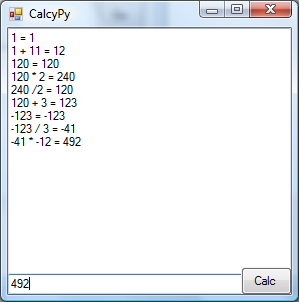
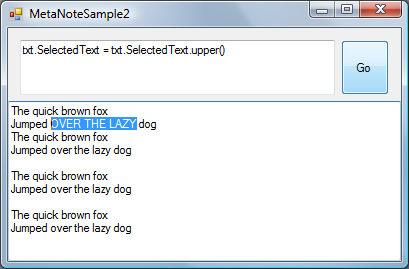
 Despite knowing absolutely nothing about Python, I've had a lot of fun and a few lttle victories with it tonight. I've built two small apps that I'll include the code for below. I've avoided IronPython up until now, but a terrible problem has arisen lately. I've decided to write my own text editor. This is a bad thing. Only fools write their own text editor. Soon, hair will start growing on the palms of my hands. But, since I'm looking for some extensibility in this editor idea (of which I'll show more in a subsequent post) I realised that hosting IronPython is the best way to get the sort of scripting I'm after. Hosting IronPython in C# is well-trodden turf. Many other have been there and blogged it before. But the fun was really in the doing. Here's two very short demo apps I wrote tonight, literally in under an hour. First, by following the example Bernie Almosni provides in Extending your c# application with IronPython I built a little interactive calculator, with a history. The code is trivial and can be downloaded below.  The next example is also trivial, but I'll step through the code just quickly, since it's a superset of the previous example. I wrote a little application that lets you write python code to alter the contents of a textbox. This is the heart of the editor I have in mind -- and it's barely 10 lines! So, in a fresh C# winforms app, I added references to all the dll's in C:\Program Files\IronPython 2.0.1 (I didn't know which dlls i needed exactly -- so i referenced them all ;-) ) I created a new form and dropped two text boxes and a button on it, as you'll see in the screenshot. I added these using statements: using IronPython.Hosting; using Microsoft.Scripting; using Microsoft.Scripting.Hosting;
I created two module levels variables, one to hold the IronPython engine, and one to tell it the 'scope' of the variables I want to share with it. private ScriptEngine m_engine = Python.CreateEngine(); private ScriptScope m_scope = null;
Upon form_load, I construct the scope, and add the target text box to it. (This is the text box our Python code will be able to act upon.) m_scope = m_engine.CreateScope(); m_scope.SetVariable("txt", TargetTextBox);
When the user clicks the button, I compile the code in the first box, and execute it as a statement. Dead simple. Ridiculously simple. string code = CommandTextBox.Text.Trim(); ScriptSource source = m_engine.CreateScriptSourceFromString(code, SourceCodeKind.SingleStatement); source.Execute(m_scope);
With that in place, the python code entered at runtime, such as: txt.SelectedText = txt.SelectedText.upper()
...has the desired effect of making the selected text uppercase. I got the same effect in C# once, but it took five assemblies, hundreds of lines of code... it was terribly fragile and I broke it beyond repair before I got it to a source repository. A tragic episode, i still feel like stabbing someone every time I think about it. (LFT much?)/p> So -- here's the source code: Sample Python Calculator and Programmable Text Box.
And here's a couple of other articles on the same topic:
'Steven Nagy' on Thu, 05 Mar 2009 19:33:10 GMT, sez: Interesting... (the IronPython integration that is, not this article). Now we can embed Quake2 style console popdowns in all our applications.
'tarn' on Thu, 05 Mar 2009 23:36:03 GMT, sez: That's fantastic, but the fun has only just begun! If you change SourceCodeKind.SingleStatement to .Statements or .File you should be able to run this IronPython code in your app..
-- CUT --
import clr
clr.AddReferenceByPartialName("System.Windows.Forms")
clr.AddReference('IronPython')
clr.AddReference('Microsoft.Scripting')
from System.Windows.Forms import *
from IronPython.Hosting import Python
from Microsoft.Scripting import SourceCodeKind
class MetaNote(Form):
def __init__(self):
self.button = Button()
self.code = TextBox()
self.text = TextBox()
self.Width = 400
self.code.Multiline = True
self.code.Height = 100
self.code.Width = 300;
self.text.Top = 100
self.text.Width = 400
self.text.Height = 300
self.text.Multiline = True
self.button.Left = 300
self.button.Text = "Go"
self.Controls.Add(self.button)
self.Controls.Add(self.text)
self.Controls.Add(self.code)
self.button.Click += self.run
def run(self,sender,e):
engine = Python.CreateEngine()
source = engine.CreateScriptSourceFromString(self.code.Text, SourceCodeKind.Statements)
scope = engine.CreateScope()
scope.SetVariable("txt", self.text);
source.Execute(scope)
f = MetaNote()
f.Show()
-- CUT --
again and again ;)
'Bengt' on Fri, 06 Mar 2009 07:48:21 GMT, sez: Use ironscheme and implement emaclisp! :)
'Mr Graviton Tepes' on Fri, 06 Mar 2009 12:19:51 GMT, sez: I really like Python!
> Use ironscheme and implement emaclisp! :)
Would it be possible to write emacs in Python?
'OJ' on Sat, 07 Mar 2009 06:29:22 GMT, sez: > Use ironscheme and implement emaclisp! :)
*sigh* There's always one isn't there.
Great post LB. I had no idea that embedding Iron(P/R) would be so easy! Great demo.
Tarn, interesting addition, though arguably geeking out a bit ;)
'ev' on Sun, 08 Mar 2009 12:05:21 GMT, sez: you know, i always wonder why would you do this (i.e. embed any scripting language in .NET Framework app), if you already have c#/vb compiler available.
Here is very nice project by Oleg Shilo which, AFAIK, grew from similar line of thinking: http://www.csscript.net/
PS. sorry in advance for resubmitting comment, but the first time i submitted it from Opera i got no notice about premoderation or anything else keeping my comment from showing up.
'lb' on Sun, 08 Mar 2009 19:35:12 GMT, sez: @ev
>why would you do this if you already c#/vb compiler available ?
Good question!
Basically, c#/vb aren't always the right tool for the job.
I've embedded c#/vb into an application before and it was much more complex to perform, and the final result was much less flexible to the task.
Here's three examples of why a dynamic language is a better choice for embedding.
1. You don't need to worry about an entry point.
In C#/VB a single statement can't exist by itself -- you need to wrap them inside a class definition, and in order to make them executable, you need to setup an explicit entry point (for example in a console app, you have 'main').
This is a detail that you can hide from the end user, but it's still there and likely to lead to more complexity.
2. In C#/VB, the minimum unit is an entire assembly. With a dynamic language, you can get an Abstract Syntax Tree.
If you need to do something with the compiled code other than run it, then having an abstract syntax tree can be useful. With a full assembly, you can use reflection and CodeDom to inspect more detail, but this is considerably more involved.
3. Iron python is more succinct.
I can also think of arguments *against* using IronPython -- for example, if the end user has no familiarity with it, or willingness to gain any.
If 'raw performance' is required then maybe a dynamic language will hold you back (but then again, maybe a plugin solution is not the best approach in such a case anyhow)
'2xThomas' on Sat, 10 Apr 2010 23:32:26 GMT, sez: Mr Graviton Tepes, sure. You can write emacs in Python if you want to. Don't see why you would want to do that.
Open up the Python interpreter console and then type: emacs. Congratulations! You have now written emacs in Python. Wow!
|
Articles
Mind-boggling Demo of New Gaming Genre, aka Folder-Based Hangman, aka Fun with Recursion
Got CSV in your javascript? Use agnes.
I went to write down a book name and founded an internet empire instead.
NimbleText: Origins
The Windows 8 Mullet
Cosby: spontaneous striped background generator
Slides from WDCNZ: Live Coding Asp.net MVC3
MVC 3, "Third Times a Charm" references
Custom Errors in ASP.Net MVC: It couldn't be simpler, right?
Anatomy of a Domain Hijacking, part 2: The Website Who Came In From The Cold
Anatomy of a Domain Hijacking, part 1
secretGeek.net domain has been stolen. The site may go down.
Boring article: 'untrusted domain' issue with SQL Server.
Coding While You Commute
Test Driven Dentistry Is A Good Thing
The 'less crashy' release of NimbleText
Rethinking Toolbars in Visual Studio (or any IDE)
Where shall we have lunch?
Setting up email for your microIsv
The NO Visual Studio movement: Compiling .net projects in Notepad++
ZeroOne: the editor for programmers who think in binary
Mercurial workflow for personal projects (with a .net bias)
I see you're using vim. Let me fix that for you.
The worst recruitment spam I've ever read
A thank you I forgot to say
My new product, NimbleText, is live
Grabbing the free songs of Jonathan Coulton (with Powershell)
Using NimbleSet to compare lists
Wanted: Wiki Lists (dot org)
DOS on Dope: The last MVC web framework you'll ever need
JSON Query Languages: 5 special purpose editors
What then, is b?
SQLike: A simple editor
Yet Another BizPlan Generator.
HOT GUIDS: A hot or not site for guids
How does life get better? One tiny hack at a time.
24 things to do, and 100 things *not* to do (yet) for building a MicroISV
Venture capital won't kill Jeff Atwood, it will only make him Jeffer.
A handy workflow image for newbie mercurial users
Fractal Feedback, a diversion into recreational programming
Hump-Jumping: How the Education of Computer Science can be Saved, err, maybe.
Suggested User Experience Improvements for DiffMerge
SQL Style Extensions for C#
The Movie Hollywood (And My Wife) Doesn't Want You To See: Weekend at Jacko's
Sysi: the ultimate administrators toolkit
.: secretGeek :: Complete Archives
TimeSnapper.com
Version 3.3: true productivity boost
NextAction Managing the top of your mind
NimbleText -- World's Simplest Code Generator, Text Manipulator, Data Extractor
25 steps for building a Micro-ISV
3 Minute Guide Series
Universal Troubleshooting Checklist
Top 10 SecretGeek articles
ShinyPower Now at CodePlex
RealTime Online CSS Editor
Gradient Maker
How to be depressed
You are not inadequate.
Recommended Reading
 the little schemer
The Best Software Writing I
The Business Of Software (Eric Sink)
Recommended blogs
Jeff Atwood
Joseph Cooney
Phil Haack
Scott Hanselman
Julia Lerman
Rhys Parry
Joel Pobar
Thomas White
OJ Reeves
Eric Sink
Aggregated Links
proggit
dzone
hacker news
dot net kicks
Human Link Machines
interesting finds
a continuous learner's weblog
arjan's world
weekly link post
LogEnvy - event logs made sexy
Computer, Unlocked. A rapid computer customization resource
PC Smart Buys - Computer Hardware in Australia
|