Agile for one: The Personal Story 'Wall' In Action
secretGeek .:dot Nuts about dot Net:.
home .: about .: sign up .: sitemap .: secretGeek RSS

Agile for one: The Personal Story 'Wall' In Action

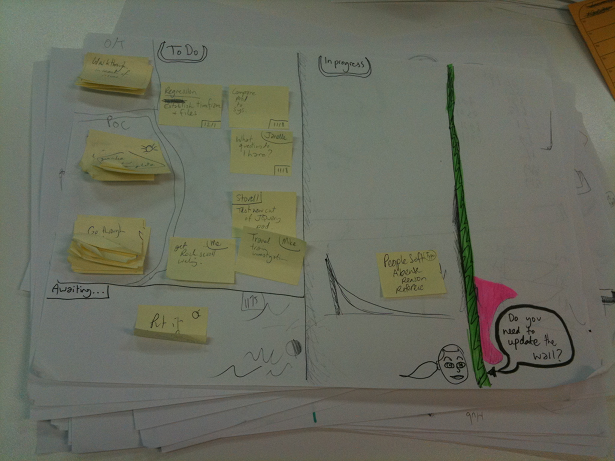
The miniature story wall on my desk (that little cartoon is a picture of my iteration manager reminding me to update the main story wall whenever a completed task relates to one of the customer stories)
Personal A3 story 'wall' on my desk...
To-Do | In-Progress | Done

In the article ‘No Surprises' Rands has a great throw-away line. He says:

"My move is to keep a yearlong log of significant work as a task in whatever task tracking system I'm currently ignoring."
[emphasis added]

I've got a 'wall' on my desk.

I've got an agile-style 'story wall' sitting on my desk at work: this is my latest task tracking system to ignore -- but so far, over three or so weeks, it's working out swimmingly. The most productive and least ignorable system I've ever used. (and, like most people, i've used a few)

Ingredients

  • An A3 sheet of paper.
  • A deck of extra-small post-it notes.
  • A pen.

Instructions

  • Divide the A3 paper into three columns. "To-Do", "In-Progress", "Done" (or synonyms there-of).

  • Leave this thing on your desk, beside whichever hand you write with.

  • Be quick to add post-it notes.

  • One word is enough for many post-it notes. (I'm the only one who has to understand them)

Pro-tips

Post-it notes have a tendency to curl up slightly at the bottom. This makes them hard to read when they're stuck to paper sitting on your desk. So rotate them around and write on them upside down.

If there's a 'real' task system that you're s'posed to be updating, then make sure you write the task number (or bug number, or work item number, or whatever it's called) onto the corner of the post-it note. Write it in a consistent place and you'll be more likely to do this when required.

Reserve one corner of the A3 sheet, and give it a heading "Waiting for...". Park any post-its here where you're waiting for someone to get back to you.

The A3 sheet also acts as a good area for 'doodling' if you're a doodler. (I'm a seasoned doodler). When the sheet gets full-up, you can transfer over to fresh one in a jiffy.

The latest trick, is that I limit the amount of 'in-progress' tasks to just 2. I use the kanban/lean trick of having only two 'slots' available in the 'In progress' section. So if there's already 2 items in progress, and I want to do a new item, I have to either complete one of the current items, or move it to the back log. This little trick is a brilliant addition (thanks to James Brett for the suggestion.)

Why does it work so well?

People are often tempted to create internet-based 'todo-tracking' systems. I've said it before:

"Placing an anti-procrastination tool on the internet is like hosting an alcoholics anonymous meeting inside a brewery."

By moving the todo-list completely outside the computer, it moves it away from so many of the distractions that destroy productivity.

And by using little post-it notes, we get the benefit of being able to manipulate the tasks, with no pressure to over-describe the task at hand.

Here's a schematic that shows the approximate shape of my more recent versions of this (the photo above is a week or two out of date now) It'll be different again in a few days, this is very much a work in progress:

template of my current miniature story wall

(Talk of 'systems to ignore' reminds me of an experimental WPF-app I built a few months ago, seemingly named 'OnTrack':
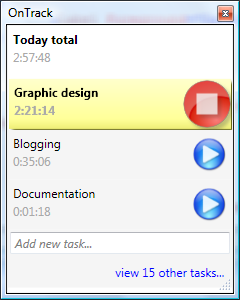
OnTrack, my first WPF app... i spent more time styling the stop button than i spent writing all of nextAction

It looks nice, promises much... but I spent more time styling the stop button than i spent writing all of NextAction, hence, one is shipping and works well, while the other is now just a screenshot of some lost code.


'Don2' on Fri, 23 Oct 2009 11:50:16 GMT, sez:

Hey there. Strictly speaking this isn't a 'story wall' it's a 'task board.'

And I believe that Post-it notes is a registered trademark.

D2.
(I'm just pretending to be that guy on the internet who pokes holes in everything you say. Interesting idea, I may try it)


'John' on Fri, 23 Oct 2009 11:58:01 GMT, sez:

Excellent! Post-it notes rule for everything!


'Doeke' on Fri, 23 Oct 2009 12:01:01 GMT, sez:

I've also got a paper story wall. Not for computers but all the other stuff. Now that you are telling about it, I remember it's laying on top of my piano. Have been ignoring it for at least a year ;-)


'Dave' on Fri, 23 Oct 2009 12:09:55 GMT, sez:

That WPF app looks like exactly what I need! Where's the link to download?


'Goran' on Fri, 23 Oct 2009 12:45:14 GMT, sez:

But is working on To-Do board on your To-Do board?


'lb' on Fri, 23 Oct 2009 12:48:00 GMT, sez:

@Goran
in order to blog about 'todo-board' i did indeed move 4 different post-it notes across a makeshift A4 todo-board i have beside me now. They kept me focused.


'gho' on Sat, 24 Oct 2009 10:36:45 GMT, sez:

If working on 'OnTrack' was listed on your Todo-board, then maybe OnTrack would have shipped after all. Looks good. Bit blurry, like all wpf apps.


'N. J. Lindquist' on Sat, 24 Oct 2009 13:09:15 GMT, sez:

Good idea. I have something I've been using for months now in an Excel file, but there are times I wish I didn't have to go on the computer to access it. I have tried Post-it notes before, but the worked to a point, but the Excel has proven better. What it allows is for me to put specific tasks on specific dates and put in deadlines and reminders re who I am waiting for, etc. However, I think I will try to merge my file with your idea and see if I can make it work. Maybe a scrapbook instead of a single page?


'Boxy' on Mon, 26 Oct 2009 04:13:58 GMT, sez:

"Placing an anti-procrastination tool on the internet is like hosting an alcoholics anonymous meeting inside a brewery." .. Classic

Mr Bambrick, you are a genius!


'Jim Benson' on Mon, 26 Oct 2009 16:36:27 GMT, sez:

Very nicely done, I'll be sure to add it to the personal kanban design patterns posts I'm writing for next week.

The thing about keeping it offline is important. I've been experimenting with both on-line and off-line tools. On-line, agile zen has been very helpful - but tactile and always visible still works best.


'Leong Hean Hong' on Thu, 21 Jan 2010 00:14:09 GMT, sez:

Hi, thanks for the tip. This is my implementation: http://picasaweb.google.com/lh/photo/vLD-3QYsG8MqCFXICe-OCw?feat=directlink


name


website (optional)


enter the word:
 

comment (HTML not allowed)


All viewpoints welcome. But the right to delete any post for any reason is reserved. Don't make me do it. Comments may be republished, emailed to your loved ones or printed and used as toilet paper. Who reads this legal bit anyhow?

TimeSnapper is a life analysis system that stores and plays-back your computer use. It makes timesheet recording a breeze, helps you recover lost work and shows you how to sharpen your act.

TimeSnapper won last year's Developer Competition at Larkware.com, and is used by over 10,000 people.

Articles

What then, is b? What then, is b?
SQLike: A simple editor SQLike: A simple editor
Yet Another BizPlan Generator. Yet Another BizPlan Generator.
HOT GUIDS: A hot or not site for guids HOT GUIDS: A hot or not site for guids
How does life get better? One tiny hack at a time. How does life get better? One tiny hack at a time.
24 things to do, and 100 things *not* to do (yet) for building a MicroISV 24 things to do, and 100 things *not* to do (yet) for building a MicroISV
Venture capital won't kill Jeff Atwood, it will only make him Jeffer. Venture capital won't kill Jeff Atwood, it will only make him Jeffer.
A handy workflow image for newbie mercurial users A handy workflow image for newbie mercurial users
Fractal Feedback, a diversion into recreational programming Fractal Feedback, a diversion into recreational programming
Hump-Jumping: How the Education of Computer Science can be Saved, err, maybe. Hump-Jumping: How the Education of Computer Science can be Saved, err, maybe.
Suggested User Experience Improvements for DiffMerge Suggested User Experience Improvements for DiffMerge
SQL Style Extensions for C# SQL Style Extensions for C#
The Movie Hollywood (And My Wife) Doesn't Want You To See: Weekend at Jacko's The Movie Hollywood (And My Wife) Doesn't Want You To See: Weekend at Jacko's
Sysi: the ultimate administrators toolkit Sysi: the ultimate administrators toolkit

Archives .: secretGeek :: Complete Archives
TimeSnapper -- Automated Screenshot Journal TimeSnapper.com    
Version 3.3: true productivity boost

Next Action NextAction
Managing the top of your mind

World's Simplest Code Generator (html edition) World's Simplest Code Generator

25 steps for building a Micro-ISV 25 steps for building a Micro-ISV
3 minute guides -- babysteps in new technologies: powershell, JSON, watir, F# 3 Minute Guide Series
Universal Troubleshooting checklist Universal Troubleshooting Checklist
Top 10 SecretGeek articles Top 10 SecretGeek articles
ShinyPower (help with Powershell) ShinyPower
Now at CodePlex

Realtime CSS Editor, in a browser RealTime Online CSS Editor
Gradient Maker -- a tool for making background images that blend from one colour to another. Forget photoshop, this is the bomb. Gradient Maker


[powered by Google] 


How to be depressed How to be depressed
You are not inadequate.


Recommended Reading

The Best Software Writing I
The Business Of Software (Eric Sink)

Recommended blogs

Jeff Atwood
Joseph Cooney
Phil Haack
Scott Hanselman
Julia Lerman
Rhys Parry
Joel Pobar
OJ Reeves
Eric Sink

Aggregated Links

proggit
dzone
hacker news
dot net kicks

Human Link Machines

interesting finds
a continuous learner's weblog
arjan's world
weekly link post

LinkedIn profile
LogEnvy - event logs made sexy
ShuffleText - fuzzy search for .net
PC Smart Buys - Computer Hardware in Australia
 
home .: about .: sign up .: sitemap .: secretGeek RSS .: © Leon Bambrick 2006 .: privacy

home .: about .: sign up .: sitemap .: RSS .: © Leon Bambrick 2006 .: privacy