Your Brain, And the Effects of Syntax Highlighting
secretGeek .:dot Nuts about dot Net:.
home .: about .: sign up .: sitemap .: secretGeek RSS

Your Brain, And the Effects of Syntax Highlighting

Dr. Edward de Bono wrote a little epistle once, on the value of Syntax Highlighting in your IDE.

"You are in a plane that is coming in to land at Heathrow airport in London. The plane passes over several car parks. You say to yourself: 'I am going to notice all the cars coloured red.' You look at the car park and all the cars coloured red jump out to you. Red is a fairly common colour. So you choose 'bright blue'. This colour is much more rare and your eye scans over the cars. Suddenly a bright blue car jumps out of the mass.

"There are two important points about this simple experiment. The first point is that you are giving instructions to your own brain. The second is that you are 'sensitizing' the brain to certain types of input."
Edward De Bono
Textbook of Wisdom

Syntax Highlighting is a mainstay of today's IDE's -- it helps your eyes choose to look at just one thing at a time.

If you want to look at comments, you tune out all but the green writing, for example.

To detect the keywords, you look at the blue writing and only the blue writing.

Query editors were much slower than IDE's at gaining syntax highlighting. So we developed a ritual of typing keywords in UPPER case, so that the eye can separate them more easily.

Some people might argue that syntax highlighting is just a kind of garish cosmetic to distract you from the dire ugliness of the language's syntax. Perhaps if the syntax were perfect, then no highlighting would be needed. Or: the uglier the language, the more desperately it needs cosmetic enhancement from the IDE.

One way to create such ugliness is to combine lots of language in one file. Classic ASP springs to mind.

And in classic ASP, you find some pretty brutal syntax highlighting -- no one's gonna miss those bright yellow <% signs.

Some of the ugliest syntax around is found in Text Templates used for generating code. I don't blame the tools -- it's just the polyglotic nature of code gen.

My favourite codegen tool is CodeSmith -- and, naturally, CodeSmith templates can get fairly ugly.

Here, syntax highlighting is of most importance, and you find the same ultra-bright template delimiters as in ye olde Visual Interdev:
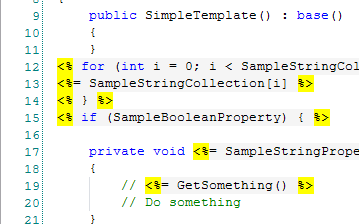
syntax highlighting in codesmith

What i'd like is something cleverer -- some way that let's you separate out the two languages that are intertwined. So that your mind can more easily switch gears between pondering one language and another. I don't know how. ;-)

Recently i've heard of a new spin on syntax highlighting -- in VB 9 you can embed XML statements directly in your code, so called 'XML literals'. These statements are 'lowlighted' instead of 'highlighted:'
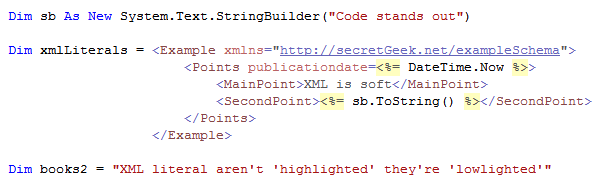
Lowlighting as a form of highlighting

Notice (above) how the xml is just slightly faded into the background. Subtle, but interesting.

I tinkered with the settings in CodeSmith to make the template delimiters a little more subtle:
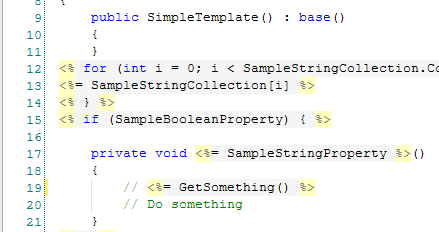
subtler syntax highlighting in codesmith

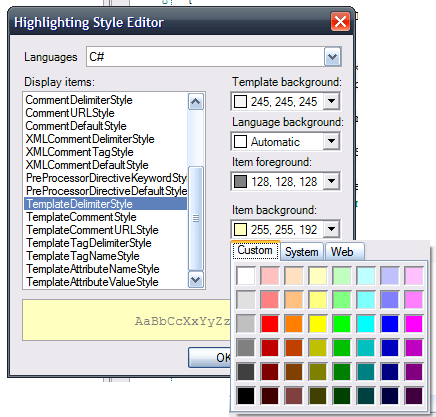
It's better, but you're limited by the color picker they use, which confines your choice somewhat.
***

CodeSmith's bin folder has a file called ActiproSoftware.SyntaxEditor.dll so i'm guessing they use components from ActiPro Software

(ActiPro: "The core SyntaxEditor control provides a free implementation of C# and Visual Basic that has syntax highlighting, outlining, and several other features.")

(Powershell Analyzer seems to use the same components.)

Wrapping this up -- i found an interesting (though not convincing) argument against syntax highlighting.


'JosephCooney' on Sat, 03 Nov 2007 10:16:43 GMT, sez:

I often write tiny to small (say 10-1000 line) programs in notepad and compile from the command-line. If the command-line is more involved than usual I add it as a comment to the first line of the file. It's quite a relaxing way to develop.


'Ryan Smith' on Mon, 05 Nov 2007 14:38:19 GMT, sez:

I don't see how anyone can program in Notepad.

I can see living without syntax highlighting and all the other useful features of a modern IDE, but for the life of me I cannot figure out how anyone codes without a decent implementation of "ctrl-z"


'Greg' on Sat, 10 Nov 2007 08:06:17 GMT, sez:

From

When Perl 6 arrives I'd like a two colour system that indicates whats a new Perl 6 feature and whats an old Perl 5 feature. (this was the one that sparked the train of thought)

When I'm being a maintenance programmer I'd like a colour system that indicates the age of the code sections when I'm tracking down a newly found bug.

When I'm being a code reviewer I'd like to be able to tell what is covered by unit tests and what is not.

When I'm optomising code I'd like frequence of execution mapped to the colour so I can see the hot spots in a nice hot red.


name


website (optional)


enter the word:
 

comment (HTML not allowed)


All viewpoints welcome. But the right to delete any post for any reason is reserved. Don't make me do it. Aim for constructiveness. Comments may be republished, emailed to your loved ones or printed and used as toilet paper. Also, I get particularly nasty on comment spam. It's not worth even trying to post comment spam here -- your html is escaped, and your links are given a rel='nofollow'. By attempting to post a comment, you understand that if the comment is considered spam, at my absolute discretion, your IP address may be used as the target of a prolonged distributed denial of service attack. Your electricity might suddenly stop working. Your car tyres will go mysteriously flat. You will suffer permanent hairloss. Your dreams will be filled with terrifying monsters. And in any case I reserve the right to record and publish your IP address.


TimeSnapper is a life analysis system that stores and plays-back your computer use. It makes timesheet recording a breeze, helps you recover lost work and shows you how to sharpen your act.


NimbleText - FREE text manipulation and data extraction

NimbleText is a Powerful FREE Tool

Use it for:

  • extracting data from text
  • manipulating text
  • generating code

It makes you look awesome. Use it right now! Go on! Hurry! Don't walk, run!


Articles

Mind-boggling Demo of New Gaming Genre, aka Folder-Based Hangman, aka Fun with Recursion Mind-boggling Demo of New Gaming Genre, aka Folder-Based Hangman, aka Fun with Recursion
Got CSV in your javascript? Use agnes. Got CSV in your javascript? Use agnes.
I went to write down a book name and founded an internet empire instead. I went to write down a book name and founded an internet empire instead.
NimbleText: Origins NimbleText: Origins
The Windows 8 Mullet The Windows 8 Mullet
Cosby: spontaneous striped background generator Cosby: spontaneous striped background generator
Slides from WDCNZ: Live Coding Asp.net MVC3 Slides from WDCNZ: Live Coding Asp.net MVC3
MVC 3, MVC 3, "Third Times a Charm" references
Custom Errors in ASP.Net MVC: It couldn't be simpler, right? Custom Errors in ASP.Net MVC: It couldn't be simpler, right?
Anatomy of a Domain Hijacking, part 2: The Website Who Came In From The Cold Anatomy of a Domain Hijacking, part 2: The Website Who Came In From The Cold
Anatomy of a Domain Hijacking, part 1 Anatomy of a Domain Hijacking, part 1
secretGeek.net domain has been stolen. The site may go down. secretGeek.net domain has been stolen. The site may go down.
Boring article: 'untrusted domain' issue with SQL Server. Boring article: 'untrusted domain' issue with SQL Server.
Coding While You Commute Coding While You Commute
Test Driven Dentistry Is A Good Thing Test Driven Dentistry Is A Good Thing
The 'less crashy' release of NimbleText The 'less crashy' release of NimbleText
Rethinking Toolbars in Visual Studio (or any IDE) Rethinking Toolbars in Visual Studio (or any IDE)
Where shall we have lunch? Where shall we have lunch?
Setting up email for your microIsv Setting up email for your microIsv
The NO Visual Studio movement: Compiling .net projects in Notepad++ The NO Visual Studio movement: Compiling .net projects in Notepad++
ZeroOne: the editor for programmers who think in binary ZeroOne: the editor for programmers who think in binary
Mercurial workflow for personal projects (with a .net bias) Mercurial workflow for personal projects (with a .net bias)
I see you're using vim. Let me fix that for you. I see you're using vim. Let me fix that for you.
The worst recruitment spam I've ever read The worst recruitment spam I've ever read
A thank you I forgot to say A thank you I forgot to say
My new product, NimbleText, is live My new product, NimbleText, is live
Grabbing the free songs of Jonathan Coulton (with Powershell) Grabbing the free songs of Jonathan Coulton (with Powershell)
Using NimbleSet to compare lists Using NimbleSet to compare lists
Wanted: Wiki Lists (dot org) Wanted: Wiki Lists (dot org)
DOS on Dope: The last MVC web framework you'll ever need DOS on Dope: The last MVC web framework you'll ever need
JSON Query Languages: 5 special purpose editors JSON Query Languages: 5 special purpose editors
What then, is b? What then, is b?
SQLike: A simple editor SQLike: A simple editor
Yet Another BizPlan Generator. Yet Another BizPlan Generator.
HOT GUIDS: A hot or not site for guids HOT GUIDS: A hot or not site for guids
How does life get better? One tiny hack at a time. How does life get better? One tiny hack at a time.
24 things to do, and 100 things *not* to do (yet) for building a MicroISV 24 things to do, and 100 things *not* to do (yet) for building a MicroISV
Venture capital won't kill Jeff Atwood, it will only make him Jeffer. Venture capital won't kill Jeff Atwood, it will only make him Jeffer.
A handy workflow image for newbie mercurial users A handy workflow image for newbie mercurial users
Fractal Feedback, a diversion into recreational programming Fractal Feedback, a diversion into recreational programming
Hump-Jumping: How the Education of Computer Science can be Saved, err, maybe. Hump-Jumping: How the Education of Computer Science can be Saved, err, maybe.
Suggested User Experience Improvements for DiffMerge Suggested User Experience Improvements for DiffMerge
SQL Style Extensions for C# SQL Style Extensions for C#
The Movie Hollywood (And My Wife) Doesn't Want You To See: Weekend at Jacko's The Movie Hollywood (And My Wife) Doesn't Want You To See: Weekend at Jacko's
Sysi: the ultimate administrators toolkit Sysi: the ultimate administrators toolkit

Archives .: secretGeek :: Complete Archives
TimeSnapper -- Automated Screenshot Journal TimeSnapper.com    
Version 3.3: true productivity boost

Next Action NextAction
Managing the top of your mind

NimbleText -- World's Simplest Code GeneratorNimbleText -- World's Simplest Code Generator, Text Manipulator, Data Extractor

25 steps for building a Micro-ISV 25 steps for building a Micro-ISV
3 minute guides -- babysteps in new technologies: powershell, JSON, watir, F# 3 Minute Guide Series
Universal Troubleshooting checklist Universal Troubleshooting Checklist
Top 10 SecretGeek articles Top 10 SecretGeek articles
ShinyPower (help with Powershell) ShinyPower
Now at CodePlex

Realtime CSS Editor, in a browser RealTime Online CSS Editor
Gradient Maker -- a tool for making background images that blend from one colour to another. Forget photoshop, this is the bomb. Gradient Maker


[powered by Google] 


How to be depressed How to be depressed
You are not inadequate.


Recommended Reading


the little schemer


The Best Software Writing I
The Business Of Software (Eric Sink)

Recommended blogs

Jeff Atwood
Joseph Cooney
Phil Haack
Scott Hanselman
Julia Lerman
Rhys Parry
Joel Pobar
Thomas White
OJ Reeves
Eric Sink

Aggregated Links

proggit
dzone
hacker news
dot net kicks

Human Link Machines

interesting finds
a continuous learner's weblog
arjan's world
weekly link post

LinkedIn profile
LogEnvy - event logs made sexy
Computer, Unlocked. A rapid computer customization resource
PC Smart Buys - Computer Hardware in Australia
 
home .: about .: sign up .: sitemap .: secretGeek RSS .: © Leon Bambrick 2006 .: privacy

home .: about .: sign up .: sitemap .: RSS .: © Leon Bambrick 2006 .: privacy