 secretGeek.net
baby steps in microsoft robotics studio...
i've always been itching to tinker with microsoft robotics studio -- but i put it on my list of "things NOT to do" a long time ago. There's not enough time to play with every good thing in life.
But last Christmas i spent a bit of time on making fractals in logo, and learning F#, and drawing awesome robot pictures... so it's only fair that this christmas i'd crack out microsoft robotics studio and give it a tinker.
As a bonus, my nephews are around and I was hoping to help get them hooked on a life of computer programming.
first impression:
stupid roadblocks. I know this is an awesome base operating system to unify and enable all the robotics systems of the world... but my god, nothing is obvious. The "pit of success" idea seems to have overlooked these guys.
I like to jump in anywhere and hope that it makes sense. That didn't seem to be appropriate here. Jumping in anywhere lead to confusion.
So I swallowed my pride and headed to the first tutorial. That was utterly lame. So I moved to tutorial 2. Lame. There is no tutorial 3... no sure why, but the next in line is tutorial 4. I loaded that in visual studio, compiled and ran... okay... some potential here... something to sink my teeth into... but oh god, how about that confusing user interface from the team that UX forgot.
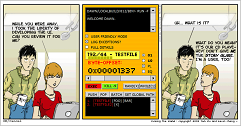
Quick reminder about User-Interfaces By Developers
Dear developers (and this includes me) -- please don't open up the windows forms designer, blow chunks wildly, and then publish it to the world.
Either get a usability expert to provide some nice feedback or, at the very least, see if your little sister can understand how to use it. Pure developer UI can be a terrible thing.
Now back to the task at hand.
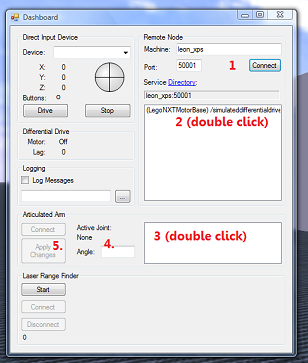
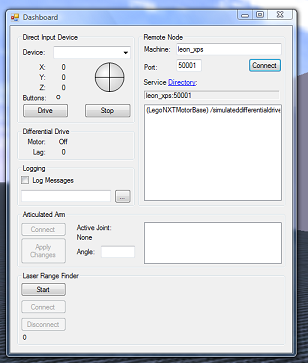
Explain this to me... someone... please...
Variations on this 'dashboard' form are common in the tutorials. And it's very 'developer UI'. This form is fail.
Generally if you click anywhere on this form you get two responses: nothing, or an exception.
After a lot of experimentation I worked out that you have to click in the boxes in a particular order (that the UI doesn't give any clues about).
Your average programmer would be able to work this out quite easily if they were motivated. Fine. But don't even think about handing this to your little nephews.
After working out the right order, we went in to the code (we being me plus my brother in law Rick) and re-ordered the controls to make it more appropriate, and gave better feedback on errors. A two minute refactoring, seriously.
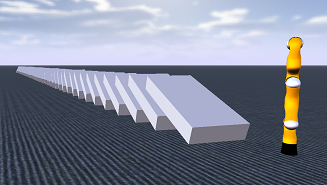
Now we found that, with meticulous clicking and typing, we could convince the articulated robot arm to move in whatever way we wanted. (Yay! We knocked the dominoes over!)
It was cool in a way that only your most-geeky segment of the audience could begin to comprehend. For example, I loved it. But the nephews: not so much.
I'm pretty sure it gave little more than a whiff of the real power of this platform. I've listened to podcasts where people rave about the concurrency and coordination runtime, and the way real industrial houses use this software to simulate, build and control their real-world robots. From where I am right now, it takes quite a bit of imagination to see those distant capabilities.
Some things I'd love to be able to do:
- click on an object in the simulation environment and thus have it 'selected' in the remote control. (or even less -- float over an object in the simulation and have its name as a tooltip)
- record a series of movements and replay them.
- use a
logo-like language for talking to these little robots. The powershell team could give great guidance on this. - move the cameras around. (I know I can work this out programmatically -- but it's a pretty basic thing I shouldn't need to be a programmer to achieve)
- Hit reset -- to get the scene back to how it was at the start.
Computer games are full of lessons. They give you clear goals that get progressively harder. What each 'simulation' needs is an obvious goal. The final goal for tutorial 50 might be: write an autonomous robot that can drive 100 kilometres through rough terrain, unassisted. Some goals from intermediate levels: tell a robot to move; teach a robot-mouse to solve a puzzle; use a vision sensor to shoot down a robot duck.

In the meantime, anyone know what would be a good robot to purchase? I'd like to get a real world robot, provided I can also tinker with it in robotics studio. Some of the things i'd like it to be able to do for me:
- Mowing the lawn, including trimming the edges.
- The shopping (everything from keeping track of supplies, to collecting the goods)
- Organising breakfast (and cleaning up afterward.)
- Noticing when the batteries are low on my phone (or ipod, or camera, etc.) and re-charging the items as needed.
- Hunting down and killing anyone who has ever annoyed me.
- Giving gifts to children once per year.
I imagine he'll look something like this -->
Next → ← PreviousMy book "Choose Your First Product" is available now.
It gives you 4 easy steps to find and validate a humble product idea.