The NO Visual Studio movement: Compiling .net projects in Notepad++
secretGeek .:dot Nuts about dot Net:.
home .: about .: sign up .: sitemap .: secretGeek RSS

The NO Visual Studio movement: Compiling .net projects in Notepad++

What is the NO Visual Studio Movement?

I don't talk about it much, but I'm the chief of an underground technical movement called the 'NO Visual Studio' movement, or NoVS to its friends.

NO in this case doesn't mean 'No.' We steal from the NoSQL movement and re-define NO to mean 'Not Only'.

In NoVS we respect that sometimes a set of lightweight tools can be more powerful (and certainly more enjoyable) than the 'one tool to rule them all' philosophy of VS. Sometimes low-power = high productivity.

The movement has its roots in this talk by Charles Petzold, 'Does Visual Studio Rot the Mind?' The final section, 'The Pure Pleasures of Pure Coding' is most relevant:

I decided to use plain old ANSI C, and to edit the source code in Notepad -- which has no IntelliSense and no sense of any other kind -- and to compile on the command line...

...there's no APIs, there's no classes, there's no properties, there's no forms, there's no controls, there's no event handlers, and there's definitely no Visual Studio.

It's just me and the code, and for awhile, I feel like a real programmer again.

He says everything right there in a nutshell. Every word is like strong whiskey.

In keeping with the NoVS movement, my favourite machine is a mini-laptop I use on the bus. It's a true 'No Visual Studio' machine where the only IDE is Notepad++.

Mostly I write javascript, and occasionally C# and Silverlight. NimbleText, for example, was developed almost entirely 'NoVS' style.

I've tweaked my setup lately so that I can compile entire .net projects from inside notepad++ -- and I thought I'd share that bit with you now.

Compiling .net projects in Notepad++

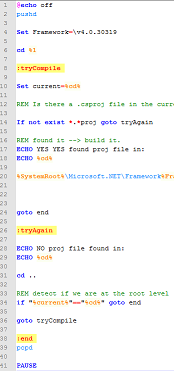
Download this file and put it in your Documents folder:

Download tryCompile.txt (rename it as .bat)


Rename it to tryCompile.bat... and always read batch files before running them on your own machine. (On a stranger's machine you can afford to be less cautious)

Once you've got that file in place, find notepad++'s shortcuts file. It should be here: %APPDATA%\NotePad++\shortcuts.xml

Edit that file. And under this tag <UserDefinedCommands> add the following node:

<Command name="MSBuild" Ctrl="yes" Alt="no" Shift="yes" Key="66">%USERPROFILE%\Documents\tryCompile.bat &quot;$(CURRENT_DIRECTORY)&quot;</Command>

Now, while editing any file that is part of an existing .net project, hit Ctrl-Shift-B. That will launch 'TryCompile.bat' which will in turn locate and build the correct project file for you. (It will also add an MSBuild option to the Run menu in Notepad++)

This works for C# projects, VB.net projects, Data dude projects -- anything that includes a proj file that MSBuild can consume.

If you have other tools, hacks or tweaks to further the cause don't hesitate to share them.


'Michael Silver' on Sat, 26 Feb 2011 05:01:57 GMT, sez:

If VS rots the brain, doesn't compiling from within Notepad++ do the same?


'Goran' on Sat, 26 Feb 2011 07:28:37 GMT, sez:

Eh, using syntax highlighting? Also fuv is the only editor for me!


'Doeke' on Sat, 26 Feb 2011 09:19:06 GMT, sez:

I always have a "c.cs" file stored in the root of the c-drive, so it's easy accesible. When I want to try something quick, I load this file in the editor (just load "c:\c.cs").

When editing done, just fire up the command line and type "csc c.cs && c" (ok, first you have to go to the root of the c-drive: "cd /d c:\").


'lb' on Sat, 26 Feb 2011 09:36:25 GMT, sez:

@Doeke -- that's a lot of c's.


'Pies' on Sat, 26 Feb 2011 10:38:50 GMT, sez:

Ah, the joys of having to manually compile before running :) I understand it's necessary in some types of software, but I don't want to have to do it ever again.

I think that whenever possible software should be compiled on the fly or interpreted. Perhaps there should be a special compilation mode that instead of the program binary creates a stub that checks and recompiles whatever's necessary when you run it?


'Brian' on Sat, 26 Feb 2011 10:56:22 GMT, sez:

Yer all wimps. I manipulate the 1's & 0's with a tiny magnet.


'Matt Casto' on Sat, 26 Feb 2011 11:37:25 GMT, sez:

Some other tools I like to use when not only working in VS include KaXaml, NimbleText (of course), LinqPad, WinMerge, Regulator.


'lb' on Sat, 26 Feb 2011 13:30:44 GMT, sez:

@matt -- i love linqPad and KaXaml too, and linked to them above from the words 'set' and 'of' in the third paragraph.

glad you understood that 'no' really does mean 'not only' as i do use VS on any computer powerful enough to run it adequately. (i.e. not my netbook)


'Mr. Moo' on Sat, 26 Feb 2011 15:14:43 GMT, sez:

Heh, I remember reading that article a few years ago and feeling justified. Now I read it and just feel crusty and old.

In a little bit of irony, I've done most of my perl programming in VS 2005! Obviously no text assist there - not even syntax highlighting (which Notepad++ will manage). I was just very comfortable with some features... bookmarks, find-in-files.

Also, please don't use my comments as toilet paper. (I did.)


'Don2' on Sun, 27 Feb 2011 10:53:51 GMT, sez:

But can I still use resharper?


'Jeremy D' on Tue, 01 Mar 2011 12:32:54 GMT, sez:

I'm still using Vim for C/C++ projects under windows, i should try this notepad++ one day. Btw, there's some cool plugins for vim to make it behave like an IDE :
- project http://www.vim.org/scripts/script.php?script_id=69
- omnicpp
http://www.vim.org/scripts/script.php?script_id=1520


'Sensei Loco' on Tue, 01 Mar 2011 16:42:30 GMT, sez:

Personally, I like Programmer's Notepad:
http://www.pnotepad.org/


'Petr Lev' on Thu, 01 Sep 2011 21:01:28 GMT, sez:

I tried to work in notepad++ with php, but this VS is much better!


'm' on Thu, 20 Oct 2011 16:05:45 GMT, sez:

I liked Jeff Atwood's thoughts on fizz bangs etc.

There's a lot of merit to being a swimmer, but sometimes your boss hands you a kickboard.


'mark' on Thu, 22 Dec 2011 04:57:13 GMT, sez:

i must be one of those new age programmers cause i love visual studio and it itellisense. partly because i get work done faster. i dont think the definition of real programmer mean you have to write everything in note pad++ or ANSI C to be a "real programmer". I believe as long as you can do what you stay you can without using a reference book or getting on google a thousand times then one would be called a programmer.

further more i do like to write my html in notepad++ but i always test it in VS simply because notepad++ will let you get away with things that VS wont and still yield the same results.

not to insult anyones skills but take your html and throw it in VS


'Palm Kernel Oil Press' on Wed, 15 Feb 2012 05:06:55 GMT, sez:

Thus, we will see that they are a team that does have an extraordinary means and the necessity for us to give support.


name


website (optional)


enter the word:
 

comment (HTML not allowed)


All viewpoints welcome. But the right to delete any post for any reason is reserved. Don't make me do it. Aim for constructiveness. Comments may be republished, emailed to your loved ones or printed and used as toilet paper. Also, I get particularly nasty on comment spam. It's not worth even trying to post comment spam here -- your html is escaped, and your links are given a rel='nofollow'. By attempting to post a comment, you understand that if the comment is considered spam, at my absolute discretion, your IP address may be used as the target of a prolonged distributed denial of service attack. Your electricity might suddenly stop working. Your car tyres will go mysteriously flat. You will suffer permanent hairloss. Your dreams will be filled with terrifying monsters. And in any case I reserve the right to record and publish your IP address.


TimeSnapper is a life analysis system that stores and plays-back your computer use. It makes timesheet recording a breeze, helps you recover lost work and shows you how to sharpen your act.


NimbleText - FREE text manipulation and data extraction

NimbleText is a Powerful FREE Tool

Use it for:

  • extracting data from text
  • manipulating text
  • generating code

It makes you look awesome. Use it right now! Go on! Hurry! Don't walk, run!


Articles

Mind-boggling Demo of New Gaming Genre, aka Folder-Based Hangman, aka Fun with Recursion Mind-boggling Demo of New Gaming Genre, aka Folder-Based Hangman, aka Fun with Recursion
Got CSV in your javascript? Use agnes. Got CSV in your javascript? Use agnes.
I went to write down a book name and founded an internet empire instead. I went to write down a book name and founded an internet empire instead.
NimbleText: Origins NimbleText: Origins
The Windows 8 Mullet The Windows 8 Mullet
Cosby: spontaneous striped background generator Cosby: spontaneous striped background generator
Slides from WDCNZ: Live Coding Asp.net MVC3 Slides from WDCNZ: Live Coding Asp.net MVC3
MVC 3, MVC 3, "Third Times a Charm" references
Custom Errors in ASP.Net MVC: It couldn't be simpler, right? Custom Errors in ASP.Net MVC: It couldn't be simpler, right?
Anatomy of a Domain Hijacking, part 2: The Website Who Came In From The Cold Anatomy of a Domain Hijacking, part 2: The Website Who Came In From The Cold
Anatomy of a Domain Hijacking, part 1 Anatomy of a Domain Hijacking, part 1
secretGeek.net domain has been stolen. The site may go down. secretGeek.net domain has been stolen. The site may go down.
Boring article: 'untrusted domain' issue with SQL Server. Boring article: 'untrusted domain' issue with SQL Server.
Coding While You Commute Coding While You Commute
Test Driven Dentistry Is A Good Thing Test Driven Dentistry Is A Good Thing
The 'less crashy' release of NimbleText The 'less crashy' release of NimbleText
Rethinking Toolbars in Visual Studio (or any IDE) Rethinking Toolbars in Visual Studio (or any IDE)
Where shall we have lunch? Where shall we have lunch?
Setting up email for your microIsv Setting up email for your microIsv
The NO Visual Studio movement: Compiling .net projects in Notepad++ The NO Visual Studio movement: Compiling .net projects in Notepad++
ZeroOne: the editor for programmers who think in binary ZeroOne: the editor for programmers who think in binary
Mercurial workflow for personal projects (with a .net bias) Mercurial workflow for personal projects (with a .net bias)
I see you're using vim. Let me fix that for you. I see you're using vim. Let me fix that for you.
The worst recruitment spam I've ever read The worst recruitment spam I've ever read
A thank you I forgot to say A thank you I forgot to say
My new product, NimbleText, is live My new product, NimbleText, is live
Grabbing the free songs of Jonathan Coulton (with Powershell) Grabbing the free songs of Jonathan Coulton (with Powershell)
Using NimbleSet to compare lists Using NimbleSet to compare lists
Wanted: Wiki Lists (dot org) Wanted: Wiki Lists (dot org)
DOS on Dope: The last MVC web framework you'll ever need DOS on Dope: The last MVC web framework you'll ever need
JSON Query Languages: 5 special purpose editors JSON Query Languages: 5 special purpose editors
What then, is b? What then, is b?
SQLike: A simple editor SQLike: A simple editor
Yet Another BizPlan Generator. Yet Another BizPlan Generator.
HOT GUIDS: A hot or not site for guids HOT GUIDS: A hot or not site for guids
How does life get better? One tiny hack at a time. How does life get better? One tiny hack at a time.
24 things to do, and 100 things *not* to do (yet) for building a MicroISV 24 things to do, and 100 things *not* to do (yet) for building a MicroISV
Venture capital won't kill Jeff Atwood, it will only make him Jeffer. Venture capital won't kill Jeff Atwood, it will only make him Jeffer.
A handy workflow image for newbie mercurial users A handy workflow image for newbie mercurial users
Fractal Feedback, a diversion into recreational programming Fractal Feedback, a diversion into recreational programming
Hump-Jumping: How the Education of Computer Science can be Saved, err, maybe. Hump-Jumping: How the Education of Computer Science can be Saved, err, maybe.
Suggested User Experience Improvements for DiffMerge Suggested User Experience Improvements for DiffMerge
SQL Style Extensions for C# SQL Style Extensions for C#
The Movie Hollywood (And My Wife) Doesn't Want You To See: Weekend at Jacko's The Movie Hollywood (And My Wife) Doesn't Want You To See: Weekend at Jacko's
Sysi: the ultimate administrators toolkit Sysi: the ultimate administrators toolkit

Archives .: secretGeek :: Complete Archives
TimeSnapper -- Automated Screenshot Journal TimeSnapper.com    
Version 3.3: true productivity boost

Next Action NextAction
Managing the top of your mind

NimbleText -- World's Simplest Code GeneratorNimbleText -- World's Simplest Code Generator, Text Manipulator, Data Extractor

25 steps for building a Micro-ISV 25 steps for building a Micro-ISV
3 minute guides -- babysteps in new technologies: powershell, JSON, watir, F# 3 Minute Guide Series
Universal Troubleshooting checklist Universal Troubleshooting Checklist
Top 10 SecretGeek articles Top 10 SecretGeek articles
ShinyPower (help with Powershell) ShinyPower
Now at CodePlex

Realtime CSS Editor, in a browser RealTime Online CSS Editor
Gradient Maker -- a tool for making background images that blend from one colour to another. Forget photoshop, this is the bomb. Gradient Maker


[powered by Google] 


How to be depressed How to be depressed
You are not inadequate.


Recommended Reading


the little schemer


The Best Software Writing I
The Business Of Software (Eric Sink)

Recommended blogs

Jeff Atwood
Joseph Cooney
Phil Haack
Scott Hanselman
Julia Lerman
Rhys Parry
Joel Pobar
Thomas White
OJ Reeves
Eric Sink

Aggregated Links

proggit
dzone
hacker news
dot net kicks

Human Link Machines

interesting finds
a continuous learner's weblog
arjan's world
weekly link post

LinkedIn profile
LogEnvy - event logs made sexy
Computer, Unlocked. A rapid computer customization resource
PC Smart Buys - Computer Hardware in Australia
 
home .: about .: sign up .: sitemap .: secretGeek RSS .: © Leon Bambrick 2006 .: privacy

home .: about .: sign up .: sitemap .: RSS .: © Leon Bambrick 2006 .: privacy