MS Paint //Master Class//
secretGeek .:dot Nuts about dot Net:.
home .: about .: sign up .: sitemap .: secretGeek RSS

MS Paint //Master Class//

Okay, I've been meaning to run an "MSPaint.exe" master class for a while now.

Here's the first lesson.... This could save you a lot of paper, and a lot of sticky tape.
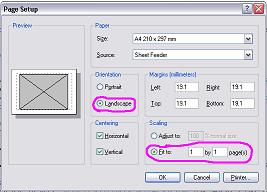
mspaint master class -- page setup

MSPaint, (or "Ms Paint" as she prefers to be known) doesn't have much, but she does have a "Page Setup" dialog.

The clever thing about this is that it contains the option:

Hence, when printing, there is no need for your screenshot to span over two portrait pages. (And screenshots, of course, are what Ms Paint is best at.)

This is bad news for companies that sell sticky tape.
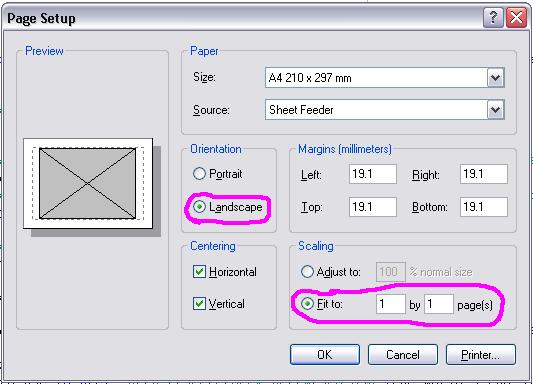
mspaint master class -- page setup


'3M Representative' on Sun, 31 Jul 2005 00:49:42 GMT, sez:

Do you know how long we lobbied Microsoft to remove this option? And now you're broadcasting it to the world. We're doomed. I hope you're happy when I end up living in a box under a bridge Mr Secret Geek.


[serioiusly though... cool tip, thanks!)


'Boxy' on Sun, 31 Jul 2005 21:24:30 GMT, sez:

YOU... are a genius!.. I’d class myself as a MSPaint power user and never realised this.. but then again I hardly ever print... can’t wait for your next MS Paint Master class!


'lb' on Sun, 31 Jul 2005 23:07:31 GMT, sez:

hey boxy! glad to help.

congrats on the news regarding little boxies!


'Farmer Jeb' on Mon, 01 Aug 2005 05:14:09 GMT, sez:

An extremely underrated little gem that MS Paint. I've long considered myself a Power User too (I did know about Page Setup) but a quick scan through its finite menus shows a few functions I've never used...


'JesPeachy' on Tue, 02 Aug 2005 01:10:54 GMT, sez:

niiiiiiiice...

No more scrolling forever to get to the handle...


'Brian D' on Wed, 10 Aug 2005 16:35:42 GMT, sez:

Is this with Windows XP and 2003 and up? I have a windows 2000 Pro station and didn't have the option.


'Roger' on Wed, 21 Sep 2005 08:39:05 GMT, sez:

Can this setup be saved, so I don't have to enter these values again?


'Phil' on Tue, 04 Oct 2005 18:17:48 GMT, sez:

Discovered this little secret, but what if I need a paint doc in portrait? How do I flip the gray box into a portrait position?


'jack richards' on Tue, 13 Dec 2005 13:00:51 GMT, sez:

man, i use paint all day- and love it. in fact, i'm going to "burn" one of my coworkers right now and will DEFINITELY use this screenshot tip!!!


'Anthony Vitucci ' on Tue, 13 Dec 2005 13:06:37 GMT, sez:

I never realized the power of MS Paint !!! I can actually resize my face and put it next to Christopher Lowell !!! this is unbelievable !!!


'Anthony Nelson' on Tue, 13 Dec 2005 13:09:44 GMT, sez:

that's funny because it's not true.


'Batman' on Tue, 13 Dec 2005 13:11:25 GMT, sez:

I like to paste my head onto Batman's steamy body...Oh how I just love that skin tight suit he wears...I wish I was him....


'mspaint user' on Sat, 14 Jan 2006 20:14:13 GMT, sez:

Are there any other mspaint tips and secrets anybody would like to share? Thanks


'chris' on Sat, 07 Oct 2006 02:28:12 GMT, sez:

there are loads of thinge that paint can do and as for the head swop yes you can n its easy (i like the copy bit that carnt see the colour white thats well cool (left hand side the bottom box option!) most of my web site is done by paint,
i would love to know if i can set my page to print on 13cm by 13cm paper then i will save more paper!


'Lilo' on Mon, 22 Jan 2007 14:12:12 GMT, sez:

This is so amazing. Thanks for sharing this with us! *smiles*


'AMcT' on Wed, 24 Jan 2007 20:30:35 GMT, sez:

Where can you change the Page Setup defaults? I don't want Centering selected by default.


'Mon B' on Mon, 26 Mar 2007 18:59:35 GMT, sez:

Yes, I want to know where to change the Page Setup Defaults as well.


'lb' on Wed, 20 Jun 2007 21:23:06 GMT, sez:

Sorry AMcT and Mon B,
Page Setup defaults are not configurable!

Unless there's some registry hack... maybe.


name


website (optional)


enter the word:
 

comment (HTML not allowed)


All viewpoints welcome. But the right to delete any post for any reason is reserved. Don't make me do it. Aim for constructiveness. Comments may be republished, emailed to your loved ones or printed and used as toilet paper. Also, I get particularly nasty on comment spam. It's not worth even trying to post comment spam here -- your html is escaped, and your links are given a rel='nofollow'. By attempting to post a comment, you understand that if the comment is considered spam, at my absolute discretion, your IP address may be used as the target of a prolonged distributed denial of service attack. Your electricity might suddenly stop working. Your car tyres will go mysteriously flat. You will suffer permanent hairloss. Your dreams will be filled with terrifying monsters. And in any case I reserve the right to record and publish your IP address.


TimeSnapper is a life analysis system that stores and plays-back your computer use. It makes timesheet recording a breeze, helps you recover lost work and shows you how to sharpen your act.


NimbleText - FREE text manipulation and data extraction

NimbleText is a Powerful FREE Tool

Use it for:

  • extracting data from text
  • manipulating text
  • generating code

It makes you look awesome. Use it right now! Go on! Hurry! Don't walk, run!


Articles

Just Wally Just Wally
The Correct Order for a First Time Viewing of The Lord Of The Rings The Correct Order for a First Time Viewing of The Lord Of The Rings
A new era for Android. A new era for Android.
Mind-boggling Demo of New Gaming Genre, aka Folder-Based Hangman, aka Fun with Recursion Mind-boggling Demo of New Gaming Genre, aka Folder-Based Hangman, aka Fun with Recursion
Got CSV in your javascript? Use agnes. Got CSV in your javascript? Use agnes.

Archives Complete secretGeek Archives

TimeSnapper -- Automated Screenshot Journal TimeSnapper: automatic screenshot journal
NimbleText -- World's Simplest Code Generator NimbleText: Code Generator, Text Manipulator, Data Extractor

25 steps for building a Micro-ISV 25 steps for building a Micro-ISV
3 minute guides -- babysteps in new technologies: powershell, JSON, watir, F# 3 Minute Guide Series
Universal Troubleshooting checklist Universal Troubleshooting Checklist
Top 10 SecretGeek articles Top 10 SecretGeek articles
ShinyPower (help with Powershell) ShinyPower
Now at CodePlex

Realtime CSS Editor, in a browser RealTime Online CSS Editor
Gradient Maker -- a tool for making background images that blend from one colour to another. Forget photoshop, this is the bomb. Gradient Maker


[powered by Google] 


How to be depressed How to be depressed
You are not inadequate.


Recommended Reading


the little schemer


The Best Software Writing I
The Business Of Software (Eric Sink)

Recommended blogs

Jeff Atwood
Joseph Cooney
Phil Haack
Scott Hanselman
Julia Lerman
Rhys Parry
Joel Pobar
Thomas White
OJ Reeves
Eric Sink

Aggregated Links

proggit
dzone
hacker news
dot net kicks

Human Link Machines

interesting finds
a continuous learner's weblog
arjan's world
weekly link post

LinkedIn profile
LogEnvy - event logs made sexy
Computer, Unlocked. A rapid computer customization resource
PhysioTec, Brisbane Specialist Physiotherapy & Pilates
 
home .: about .: sign up .: sitemap .: secretGeek RSS .: © Leon Bambrick 2003 .: privacy

home .: about .: sign up .: sitemap .: RSS .: © Leon Bambrick 2003 .: privacy