Hot .Net Tip: This will save you a lot of time
secretGeek .:dot Nuts about dot Net:.
home .: about .: sign up .: sitemap .: secretGeek RSS

Hot .Net Tip: This will save you a lot of time

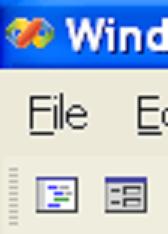
In Visual Studio .Net, these two buttons are very useful:
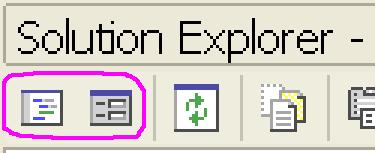
view code and view designer buttons

'View Code' and 'View Designer'.

Unfortunately, (and wrongly, i think) they are only visible when the 'Solution Explorer' window is visible.

So here's what I just did to make sure they are "ALWAYS' available -- whether the solution explorer is shown or not:

view code and view designer buttons

I am very happy about this. I think it's neat.


'Aaron Robinson' on Fri, 03 Jun 2005 13:39:42 GMT, sez:

You use your mouse when you code?!? =)


'Jason' on Fri, 03 Jun 2005 21:09:16 GMT, sez:

I don't know if the shortcuts keys are always the same but the default F7 for code window and Shift+F7 for designer window is much better than using the toolbar for me. Now if I can only move controls on the form by one grid unit at a time with the keyboard (like the ol' VB6 designer) instead of one pixel at a time.


'sara ford' on Fri, 03 Jun 2005 22:27:37 GMT, sez:

The "View Code" and "View Designer" commands are available from the context menu in the editor. I guess it just depends how you learned where these commands live, but my muscle memory is to invoke the context menu and click the command. I think i can do that faster than pressing F7 or Shift-F7 at this point =)


'secretGeek' on Sat, 04 Jun 2005 21:43:12 GMT, sez:

Hey i just read some of sara's blog -- and she owns:

"feature area testing [in Visual Studio .net] outside of Accessibility Testing. One of the feature areas i own is Window Management."

Thanks for dropping by Sara!

In response to Aaron: "You use your mouse when you code?!? =)" -- I appreciate the sentiment. I do use key strokes for a lot of things, but the mouse stays handy. I could perhaps look to identifying and replacing the mouse actions I use, where possible.

I've only recently started using F12 for 'go to definition' -- and it's a real boon.

F7 and Shift-F7 sound like a necessary addition to the 'muscle memory'


'Kyralessa' on Tue, 21 Jun 2005 00:01:46 GMT, sez:

While we're on the subject, why do I have to use either F7 or Shift-F7 when I'm _already in_ the code or the designer? Why can't F7 just switch me to the one I'm not in yet? I can never remember which one takes me which place, so I usually hit both. :(


'sg' on Tue, 21 Jun 2005 01:02:25 GMT, sez:

Yeh Kyralessa -- I'm with you.
'Use F7 to Toggle between the code and the designer' -- that would be handier.

In order to remember which is which I try to think like an IDE programmer: 'design good, code better'


'David' on Fri, 24 Jun 2005 18:11:14 GMT, sez:

Seems like F7 actually now does switch between code and designer, at least in MS Visual C# 2005 Express Edition, Beta 2.

Nice.


'Alvin' on Sun, 20 Feb 2011 15:45:21 GMT, sez:

Very cool


name


website (optional)


enter the word:
 

comment (HTML not allowed)


All viewpoints welcome. But the right to delete any post for any reason is reserved. Don't make me do it. Aim for constructiveness. Comments may be republished, emailed to your loved ones or printed and used as toilet paper. Also, I get particularly nasty on comment spam. It's not worth even trying to post comment spam here -- your html is escaped, and your links are given a rel='nofollow'. By attempting to post a comment, you understand that if the comment is considered spam, at my absolute discretion, your IP address may be used as the target of a prolonged distributed denial of service attack. Your electricity might suddenly stop working. Your car tyres will go mysteriously flat. You will suffer permanent hairloss. Your dreams will be filled with terrifying monsters. And in any case I reserve the right to record and publish your IP address.


TimeSnapper is a life analysis system that stores and plays-back your computer use. It makes timesheet recording a breeze, helps you recover lost work and shows you how to sharpen your act.


NimbleText - FREE text manipulation and data extraction

NimbleText is a Powerful FREE Tool

Use it for:

  • extracting data from text
  • manipulating text
  • generating code

It makes you look awesome. Use it right now! Go on! Hurry! Don't walk, run!


Articles

Just Wally Just Wally
The Correct Order for a First Time Viewing of The Lord Of The Rings The Correct Order for a First Time Viewing of The Lord Of The Rings
A new era for Android. A new era for Android.
Mind-boggling Demo of New Gaming Genre, aka Folder-Based Hangman, aka Fun with Recursion Mind-boggling Demo of New Gaming Genre, aka Folder-Based Hangman, aka Fun with Recursion
Got CSV in your javascript? Use agnes. Got CSV in your javascript? Use agnes.

Archives Complete secretGeek Archives

TimeSnapper -- Automated Screenshot Journal TimeSnapper: automatic screenshot journal
NimbleText -- World's Simplest Code Generator NimbleText: Code Generator, Text Manipulator, Data Extractor

25 steps for building a Micro-ISV 25 steps for building a Micro-ISV
3 minute guides -- babysteps in new technologies: powershell, JSON, watir, F# 3 Minute Guide Series
Universal Troubleshooting checklist Universal Troubleshooting Checklist
Top 10 SecretGeek articles Top 10 SecretGeek articles
ShinyPower (help with Powershell) ShinyPower
Now at CodePlex

Realtime CSS Editor, in a browser RealTime Online CSS Editor
Gradient Maker -- a tool for making background images that blend from one colour to another. Forget photoshop, this is the bomb. Gradient Maker


[powered by Google] 


How to be depressed How to be depressed
You are not inadequate.


Recommended Reading


the little schemer


The Best Software Writing I
The Business Of Software (Eric Sink)

Recommended blogs

Jeff Atwood
Joseph Cooney
Phil Haack
Scott Hanselman
Julia Lerman
Rhys Parry
Joel Pobar
Thomas White
OJ Reeves
Eric Sink

Aggregated Links

proggit
dzone
hacker news
dot net kicks

Human Link Machines

interesting finds
a continuous learner's weblog
arjan's world
weekly link post

LinkedIn profile
LogEnvy - event logs made sexy
Computer, Unlocked. A rapid computer customization resource
PhysioTec, Brisbane Specialist Physiotherapy & Pilates
 
home .: about .: sign up .: sitemap .: secretGeek RSS .: © Leon Bambrick 2003 .: privacy

home .: about .: sign up .: sitemap .: RSS .: © Leon Bambrick 2003 .: privacy