TimeSnapper 2.6: Hook It Up
secretGeek .:dot Nuts about dot Net:.
home .: about .: sign up .: sitemap .: secretGeek RSS

TimeSnapper 2.6: Hook It Up

TimeSnapper 2.6 snuck out last week, and has been going well.

There's a big list of new features available in our release notes.

We've addressed the 'navigational spaghetti' that i wrote about previously, by adding a menu available from anywhere in the application.

But the big new feature...

The BIG new feature: integrated tasks

In TimeSnapper you can 'flag' a point in time, by adding a small note against it.

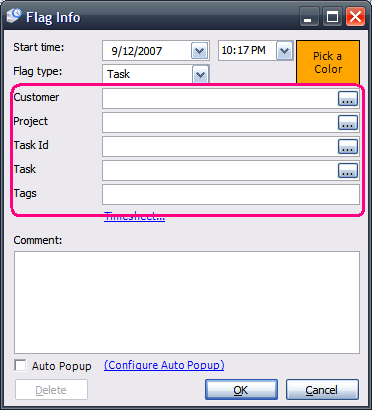
These flags can actually be quite complex -- you can link them to items in your timesheet system of choice.

For example, your company might use some application for planning the projects and tasks you are working on. TimeSnapper can be configured to retrieve that list of projects and tasks, so you can record in TimeSnapper which task you were working on at a point in time.
***

That feature has always been around, but only a tiny fraction of users have ever taken advantage of it.

The problem was that you needed to edit an XML file.

Now, rather than creating an XML file, there are forms for configuring the lookups.

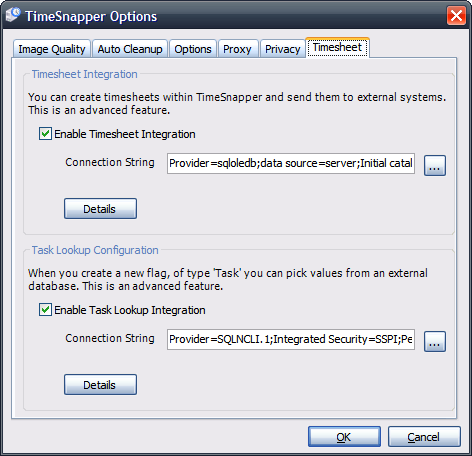
In the options form for TimeSnapper (available by right-clicking any form and selecting 'options') there is a new tab called 'TimeSheet'.
***

From here you can configure how fields in a flag are retrieved from an external system. Or you can configure how TimeSnapper's timesheets are saved to an external system.

The forms are at a stage where they're fully functional, but my god are they ugly. The first time a user sees them, I fear they'll give up in despair.

Don't get me wrong -- we've put some serious effort in. But you get to a point where you want to stop toiling in the dark, and give customers a chance to use the feature and provide guidance back to you.

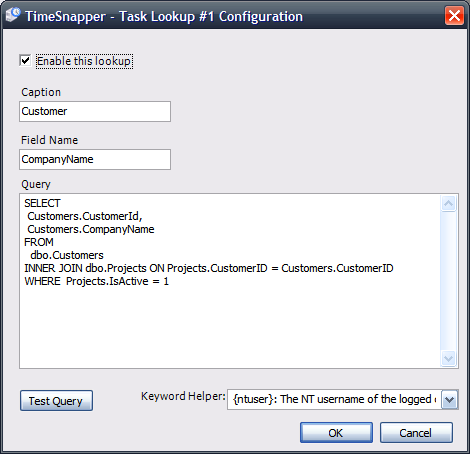
Each lookup button on the 'New Flag' dialog, basically has a 'select' query behind it:
***

We've designed it so that you can test the queries you embed, to ensure they work for your system. It was hard not to turn the system into a full blown query analyzer tool kit.

We're keen to get any feedback we can on how people use the lookup and timesheet configuration settings. Any problems, any suggestions, all are welcome.

A bunch of other features are in there as well, some of which are just the tip of new icebergs that are gradually building. I'll write about them after the next release.


'Matt Casto' on Mon, 10 Dec 2007 10:05:23 GMT, sez:

I wouldn't have even thought that the forms were ugly if you hadn't mentioned it. Perhaps I'm just used to configuration forms being practical rather than beautiful.

Can't wait to try out the new features!


'Umbrella' on Mon, 04 Feb 2008 09:00:32 GMT, sez:

Good feature, what about field "e-mail"


name


website (optional)


enter the word:
 

comment (HTML not allowed)


All viewpoints welcome. But the right to delete any post for any reason is reserved. Don't make me do it. Comments may be republished, emailed to your loved ones or printed and used as toilet paper. Who reads this legal bit anyhow?

TimeSnapper is a life analysis system that stores and plays-back your computer use. It makes timesheet recording a breeze, helps you recover lost work and shows you how to sharpen your act.

TimeSnapper won last year's Developer Competition at Larkware.com, and is used by over 10,000 people.

Articles

TimeSnapper hits the local press... and more on Iceland TimeSnapper hits the local press... and more on Iceland
MVC Zen Garden MVC Zen Garden
Is Corporate IT a form of emotional abuse? Is Corporate IT a form of emotional abuse?
Java Powered Internet? WTF? Java Powered Internet? WTF?
Life is Upstream Life is Upstream
TimeSnapper 3.3, and News From Iceland TimeSnapper 3.3, and News From Iceland
Growing Up Geek (A Hanselmeme) Growing Up Geek (A Hanselmeme)
Is that all you've got!? Is that all you've got!?
TimeSnapper 3.2: What are you afraid of? TimeSnapper 3.2: What are you afraid of?
Babbage and Boole! Babbage and Boole!
Downloadable Slide-decks: Downloadable Slide-decks: "Build your own Tiny Software Company"/"F# eye for the C# guy"
Simple Trouble Shooting Application Now Fixes Everything Simple Trouble Shooting Application Now Fixes Everything
a simple checklist for trouble-shooting regular problems a simple checklist for trouble-shooting regular problems
secretGeek at Tech-Ed: secretGeek at Tech-Ed: "How to build your own Tiny Software Company"
Bambrick versus Hanselman: Bring it! Bambrick versus Hanselman: Bring it!

Archives .: secretGeek :: Complete Archives :.
25 steps for building a Micro-ISV 25 steps for building a Micro-ISV
3 minute guides -- babysteps in new technologies: powershell, JSON, watir, F# 3 Minute Guide Series
Top 10 SecretGeek articles Top 10 SecretGeek articles

Downloads

TimeSnapper -- Automated Screenshot Journal TimeSnapper.com    
Version 3.3: true productivity boost

ShinyPower (help with Powershell) ShinyPower
Now at CodePlex

Next Action NextAction
Managing the top of your mind


[powered by Google] 


World's Simplest Code Generator (html edition) World's Simplest Code Generator
Gradient Maker -- a tool for making background images that blend from one colour to another. Forget photoshop, this is the bomb. Gradient Maker
How to be depressed How to be depressed
You are not inadequate.


Recommended Reading

The Best Software Writing I
The Business Of Software (Eric Sink)

Recommended blogs

Jeff Atwood
Reginald Braithwaite
Joseph Cooney
Phil Haack
Scott Hanselman
Julia Lerman
Joel Pobar
Eric Sink
Joel Spolsky
Des Traynor

Aggregated Links

programming.reddit.com
dzone
dot net kicks

Human Link Machines

interesting finds
a continuous learner's weblog
arjan's world
n links today
new and notable
morning coffee
learning .net
weekly link post
(my del.icio.us account)

LinkedIn profile
 
home .: about .: sign up .: sitemap .: secretGeek RSS .: © Leon Bambrick 2006 .: privacy

home .: about .: sign up .: sitemap .: RSS .: © Leon Bambrick 2006 .: privacy