TimeSnapper 2.3: Extract Text Using Optical Character Recognition
secretGeek .:dot Nuts about dot Net:.
home .: about .: sign up .: sitemap .: secretGeek RSS

TimeSnapper 2.3: Extract Text Using Optical Character Recognition

TimeSnapper 2.3 includes Optical Character Recognitiion

After much effort, we've now released the next incarnation of TimeSnapper -- version 2.3.

(Wondering what TimeSnapper is? Overview here)

The killer feature this time around is Optical Character Recognition. You can now select text straight out of the images you capture.

We've been keen to include this feature since day 1, and finally it's in!

Here's some pictures of it in action...

While viewing a screenshot taken by TimeSnapper -- right click and choose "Extract Text..."
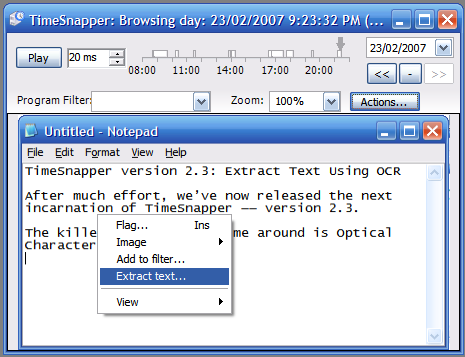
right click and choose "Extract Text..."

The image is quickly analyzed for text. Highlight the words you're interested in...
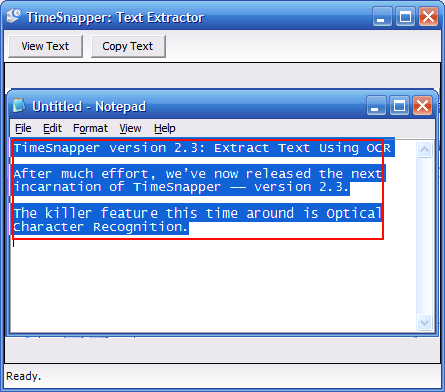
Highlight the words you are interested in

Press view text... and the extracted words are shown in a "Notepad-like" window.
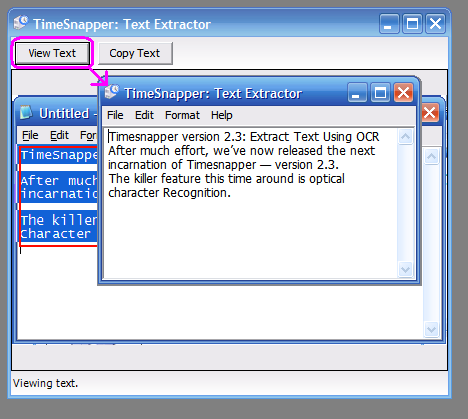
the extracted words are shown in a "Notepad-like" window

(Or press Copy text to move the text onto the clipboard).

For example, here's the text I extracted in the screenshots above:

Now we're really getting close to one of our original goals:

Never Lose Your Work Again

This feature is already getting a serious workout on my home computer. So many of the programs we use every day do not have any kind of auto-save feature. The Text Extractor in TimeSnapper completely overcomes that problem!

No more slaving over an email for an hour, only to close the browser and lose your work. There's no excuse now.

But also -- we should add that OCR technology is not magic. It doesn't get every letter right, and it can get confused by background images, and other 'artefacts' in the image. If the image you've captured is low fidelity (e.g. jpeg or gif) you're also going to get a lower quality OCR experience. Personally I use png at 100% quality, and I'm happy with the results.

And the credit goes to...

The OCR functionality relies on Microsoft Office Document Imaging -- which is installed with Office 2003 and Office 2007. They in turn licensed their OCR capabilities from TextBridge. So 'Extract Text...' will only work if you've got Office 2003 or Office 2007.

We probably would never have known that these features were available if it weren't for Martin Welker's excellent code project article "OCR with Microsoft® Office".

And also, Jon Galloway has been evangelising TimeSnapper, and writing about OCR -- so he gets an honourable mention.

The Unstoppable Feedback Machine That Never Sleeps

Another very helpful factor with this release was the incredible stream of feedback from Adam Cogan. (Adam's a Microsoft Regional director in Australia, and he runs Superior Software for Windows). Adam is a FEEDBACK MACHINE! Nights, weekends, early mornings, emails, IM, phone calls... he's relentless.. unstoppable... i'm just glad he harnesses his energy for good instead of evil.

As a result of his feedback there are numerous improvements to usability, consistency, attention to detail, quality. We haven't yet done everything he's asked for (we're only human) but we're a good part of the way there.

Also, we get a steady stream of emails from people using TimeSnapper who either give us suggestions or make us aware of bugs. In addition to the forum, we're pretty well equipped when it comes to feedback.

But More Feedback is still needed

But of course we still want more feedback. Does the text extraction work for you? Do you need something more from it? Anything that confuses, annoys or delights you with TimeSnapper?

Keep us informed!


'Haacked' on Sat, 24 Feb 2007 04:22:43 GMT, sez:

That is pretty hot!


'Jon Galloway' on Sat, 24 Feb 2007 05:23:20 GMT, sez:

Excellent! It's very difficult for an American to get an honourable mention - we're usually stuck with honorable mention, which is pretty boring. I'll gladly accept it.

My next bit of advice is that you need a mascot with a big clock medallion. I believe Flavor Flave is between jobs at the moment and may be available, but if not I'd humbly submit myself for your consideration.


'Matthew Martin' on Sat, 24 Feb 2007 15:20:18 GMT, sez:

Just finished installing the update. That is pure magic!


'NewUser' on Sat, 12 May 2007 07:42:27 GMT, sez:

Looks good. But I need to be able to export the flags - to txt, html etc. Do this and I'll register.


'lb' on Sat, 12 May 2007 10:09:04 GMT, sez:

Hi 'NewUser' -- we hear you loud and clear.

Version 2.4 is coming very soon. This was scheduled as a 'maybe' feature -- but now we'll ramp it up and see if we can shoehorn it in there. ;-)

Feedback! Damn we love feedback! Bring it on! BRING IT!

You won't necessarily get a lot of versatility with how you export flags though. You won't be able to like specify an xml schema to comply with and a port number with a monthly schedule to cause uploads, or anything like that. We'll see what we can do though.

Email support at timesnapper dot com to chat in person!

lb


'name goes here' on Sun, 18 May 2008 00:58:14 GMT, sez:

This is good however I would be interested in something faster, ways to make the program convert faster would be with user specifictext sections of the screen (perhaps a drag square on a priview screen or something), or a dynamic system where text is converted nonstop while recording, althogh that way may not be the most optimal


'Sourav Mohanty' on Sun, 22 Mar 2009 03:02:27 GMT, sez:

Thnks for the info , me needed some kind of above solution.
Thnks again.

Cheers,
Sourav Mohanty


'Yoga' on Wed, 14 Sep 2011 11:37:41 GMT, sez:

This tool also use for running letters ah?.. But You have any running letter extractor means please send with my mail id....


'Yoga' on Wed, 14 Sep 2011 11:39:41 GMT, sez:

MY mail id id.. yoga.sp198@gmail.com


name


website (optional)


enter the word:
 

comment (HTML not allowed)


All viewpoints welcome. But the right to delete any post for any reason is reserved. Don't make me do it. Aim for constructiveness. Comments may be republished, emailed to your loved ones or printed and used as toilet paper. Also, I get particularly nasty on comment spam. It's not worth even trying to post comment spam here -- your html is escaped, and your links are given a rel='nofollow'. By attempting to post a comment, you understand that if the comment is considered spam, at my absolute discretion, your IP address may be used as the target of a prolonged distributed denial of service attack. Your electricity might suddenly stop working. Your car tyres will go mysteriously flat. You will suffer permanent hairloss. Your dreams will be filled with terrifying monsters. And in any case I reserve the right to record and publish your IP address.


TimeSnapper is a life analysis system that stores and plays-back your computer use. It makes timesheet recording a breeze, helps you recover lost work and shows you how to sharpen your act.


NimbleText - FREE text manipulation and data extraction

NimbleText is a Powerful FREE Tool

Use it for:

  • extracting data from text
  • manipulating text
  • generating code

It makes you look awesome. Use it right now! Go on! Hurry! Don't walk, run!


Articles

Mind-boggling Demo of New Gaming Genre, aka Folder-Based Hangman, aka Fun with Recursion Mind-boggling Demo of New Gaming Genre, aka Folder-Based Hangman, aka Fun with Recursion
Got CSV in your javascript? Use agnes. Got CSV in your javascript? Use agnes.
I went to write down a book name and founded an internet empire instead. I went to write down a book name and founded an internet empire instead.
NimbleText: Origins NimbleText: Origins
The Windows 8 Mullet The Windows 8 Mullet
Cosby: spontaneous striped background generator Cosby: spontaneous striped background generator
Slides from WDCNZ: Live Coding Asp.net MVC3 Slides from WDCNZ: Live Coding Asp.net MVC3
MVC 3, MVC 3, "Third Times a Charm" references
Custom Errors in ASP.Net MVC: It couldn't be simpler, right? Custom Errors in ASP.Net MVC: It couldn't be simpler, right?
Anatomy of a Domain Hijacking, part 2: The Website Who Came In From The Cold Anatomy of a Domain Hijacking, part 2: The Website Who Came In From The Cold
Anatomy of a Domain Hijacking, part 1 Anatomy of a Domain Hijacking, part 1
secretGeek.net domain has been stolen. The site may go down. secretGeek.net domain has been stolen. The site may go down.
Boring article: 'untrusted domain' issue with SQL Server. Boring article: 'untrusted domain' issue with SQL Server.
Coding While You Commute Coding While You Commute
Test Driven Dentistry Is A Good Thing Test Driven Dentistry Is A Good Thing
The 'less crashy' release of NimbleText The 'less crashy' release of NimbleText
Rethinking Toolbars in Visual Studio (or any IDE) Rethinking Toolbars in Visual Studio (or any IDE)
Where shall we have lunch? Where shall we have lunch?
Setting up email for your microIsv Setting up email for your microIsv
The NO Visual Studio movement: Compiling .net projects in Notepad++ The NO Visual Studio movement: Compiling .net projects in Notepad++
ZeroOne: the editor for programmers who think in binary ZeroOne: the editor for programmers who think in binary
Mercurial workflow for personal projects (with a .net bias) Mercurial workflow for personal projects (with a .net bias)
I see you're using vim. Let me fix that for you. I see you're using vim. Let me fix that for you.
The worst recruitment spam I've ever read The worst recruitment spam I've ever read
A thank you I forgot to say A thank you I forgot to say
My new product, NimbleText, is live My new product, NimbleText, is live
Grabbing the free songs of Jonathan Coulton (with Powershell) Grabbing the free songs of Jonathan Coulton (with Powershell)
Using NimbleSet to compare lists Using NimbleSet to compare lists
Wanted: Wiki Lists (dot org) Wanted: Wiki Lists (dot org)
DOS on Dope: The last MVC web framework you'll ever need DOS on Dope: The last MVC web framework you'll ever need
JSON Query Languages: 5 special purpose editors JSON Query Languages: 5 special purpose editors
What then, is b? What then, is b?
SQLike: A simple editor SQLike: A simple editor
Yet Another BizPlan Generator. Yet Another BizPlan Generator.
HOT GUIDS: A hot or not site for guids HOT GUIDS: A hot or not site for guids
How does life get better? One tiny hack at a time. How does life get better? One tiny hack at a time.
24 things to do, and 100 things *not* to do (yet) for building a MicroISV 24 things to do, and 100 things *not* to do (yet) for building a MicroISV
Venture capital won't kill Jeff Atwood, it will only make him Jeffer. Venture capital won't kill Jeff Atwood, it will only make him Jeffer.
A handy workflow image for newbie mercurial users A handy workflow image for newbie mercurial users
Fractal Feedback, a diversion into recreational programming Fractal Feedback, a diversion into recreational programming
Hump-Jumping: How the Education of Computer Science can be Saved, err, maybe. Hump-Jumping: How the Education of Computer Science can be Saved, err, maybe.
Suggested User Experience Improvements for DiffMerge Suggested User Experience Improvements for DiffMerge
SQL Style Extensions for C# SQL Style Extensions for C#
The Movie Hollywood (And My Wife) Doesn't Want You To See: Weekend at Jacko's The Movie Hollywood (And My Wife) Doesn't Want You To See: Weekend at Jacko's
Sysi: the ultimate administrators toolkit Sysi: the ultimate administrators toolkit

Archives .: secretGeek :: Complete Archives
TimeSnapper -- Automated Screenshot Journal TimeSnapper.com    
Version 3.3: true productivity boost

Next Action NextAction
Managing the top of your mind

NimbleText -- World's Simplest Code GeneratorNimbleText -- World's Simplest Code Generator, Text Manipulator, Data Extractor

25 steps for building a Micro-ISV 25 steps for building a Micro-ISV
3 minute guides -- babysteps in new technologies: powershell, JSON, watir, F# 3 Minute Guide Series
Universal Troubleshooting checklist Universal Troubleshooting Checklist
Top 10 SecretGeek articles Top 10 SecretGeek articles
ShinyPower (help with Powershell) ShinyPower
Now at CodePlex

Realtime CSS Editor, in a browser RealTime Online CSS Editor
Gradient Maker -- a tool for making background images that blend from one colour to another. Forget photoshop, this is the bomb. Gradient Maker


[powered by Google] 


How to be depressed How to be depressed
You are not inadequate.


Recommended Reading


the little schemer


The Best Software Writing I
The Business Of Software (Eric Sink)

Recommended blogs

Jeff Atwood
Joseph Cooney
Phil Haack
Scott Hanselman
Julia Lerman
Rhys Parry
Joel Pobar
Thomas White
OJ Reeves
Eric Sink

Aggregated Links

proggit
dzone
hacker news
dot net kicks

Human Link Machines

interesting finds
a continuous learner's weblog
arjan's world
weekly link post

LinkedIn profile
LogEnvy - event logs made sexy
Computer, Unlocked. A rapid computer customization resource
PC Smart Buys - Computer Hardware in Australia
 
home .: about .: sign up .: sitemap .: secretGeek RSS .: © Leon Bambrick 2006 .: privacy

home .: about .: sign up .: sitemap .: RSS .: © Leon Bambrick 2006 .: privacy