TimeSnapper 2.2 -- Auto Popup? That sounds terrible!
secretGeek .:dot Nuts about dot Net:.
home .: about .: sign up .: sitemap .: secretGeek RSS

TimeSnapper 2.2 -- Auto Popup? That sounds terrible!

TimeSnapper version 2.2 was quietly released a few days ago. Atli poured his heart and soul into providing a few features that were requested by a number of people. I'd like to give a walk through of the new features, to see if they interest you, or if you've any feedback.

active-inactive

First up, it's now easier to see if TimeSnapper is currently recording, with a quick glance at the system tray. If TimeSnapepr is inactive (i.e, not recording) you'll see a big red cross through the tray icon.

More controversial, there's a new 'Auto Popup' feature. We have this turned off by default, because it's one of those "love it or hate it" features. Please read on though, because you'll need to decide for yourself if you love this feature, and then turn it on (in the options dialog) if you do.

With 'Auto Popup' you can have TimeSnapper prompt you to create a new Note (or task, or flag) on a regular interval, say every half hour. This way you can be certain that there are no blank periods in your time.
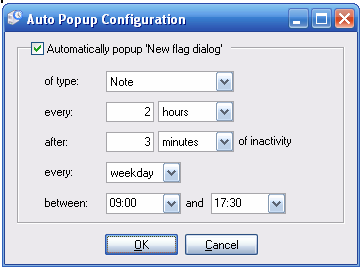
Auto Popup Config

Okay -- before you say how annoying this idea is -- take note of one special detail, a 'unit of delight' that Atli has put in there, to stop this feature from breaking your concentration:

Auto Popup Config

TimeSnapper doesn't just show the popup right when you're in the middle of typing a sentence. It waits for a small pause of inactivity. In this example, it will wait 2 hours in between bugging you. And then it will only bug you when you've been inactive for three minutes. You could equally make it ten seconds.

I like this touch, as it stops the app from the kind of 'focus stealing' you get from other popup notification systems. Anyway -- enough on that feature. Download it and try it out, if you haven't already.

One last improvement: there is a (little known) 'global shortcut key' to bring up TimeSnapper -- "[Windows Key] plus [S]". Turns out, of course, that this clashes with other software. So this is now configurable, via the options screen.

Okay -- that's all for TimeSnapper 2.2 (aside from a number of bug fixes and optimisations). Once again we broke our rule of 'one new feature per release.' -- though it was Atli who wrote all the features this time around. Feedback much appreciated as always.

The next version (2.3) could be a little delayed, as we focus on supporting, and the impending new arrivals in our personal lives ;-).

Thanks for all the positive comments and feedback over the last few days since Hanselminutes. It's been a really fun time. Cheers.


'Matthew Martin' on Tue, 23 Jan 2007 22:48:47 GMT, sez:

The red X on time snapper is a big help. Great interview on Hanselminutes! I'm almost motivated to become a micro-ISV myself now. Timesnapper will help me prove to my boss my not really working on my own commercial app at the office :-)


name


website (optional)


enter the word:
 

comment (HTML not allowed)


All viewpoints welcome. But the right to delete any post for any reason is reserved. Don't make me do it. Comments may be republished, emailed to your loved ones or printed and used as toilet paper. Who reads this legal bit anyhow?

TimeSnapper is a life analysis system that stores and plays-back your computer use. It makes timesheet recording a breeze, helps you recover lost work and shows you how to sharpen your act.

TimeSnapper won last year's Developer Competition at Larkware.com, and is used by over 10,000 people.

Articles

A face-melting DSL that allows programming ON the iPhone (and iPad) A face-melting DSL that allows programming ON the iPhone (and iPad)
The secretGeek Disaster Recovery plan The secretGeek Disaster Recovery plan
Save KNVTn! Before it's too late Save KNVTn! Before it's too late
The Ultimate Agent of WERF Destruction The Ultimate Agent of WERF Destruction
The new prisoner's dilemma The new prisoner's dilemma
Original Premise for a road movie Original Premise for a road movie
What's a better game than Devshop? What's a better game than Devshop?
DevShop: The Cool Game that Makes Development Look Fun DevShop: The Cool Game that Makes Development Look Fun
Should be purple Should be purple
Kitchen Agile Kitchen Agile
Perhaps Perhaps "Go" is the new Visual Basic
zen-coding: turn those CSS selectors upside down zen-coding: turn those CSS selectors upside down
Debugging: It's all about finding Albuquerque. Debugging: It's all about finding Albuquerque.
The Real-Time online JQuery Editor The Real-Time online JQuery Editor
HTML5, a 3 minute guide HTML5, a 3 minute guide
Developer Codpieces Developer Codpieces
Agile for one: The Personal Story 'Wall' In Action Agile for one: The Personal Story 'Wall' In Action
Never work with thick people. Never work with thick people.
Cosmo: project status panel Cosmo: project status panel
Windows Search in Japan Windows Search in Japan
Project Management Zen Project Management Zen
Continuous Integration, Plugins and Going Too Far Continuous Integration, Plugins and Going Too Far
The Rules of Stand Up The Rules of Stand Up
Sydney International Airport: Stupid, Criminal, or Criminally Stupid? Sydney International Airport: Stupid, Criminal, or Criminally Stupid?
God No! ...The ReBuilder God No! ...The ReBuilder
Matt, The Office Mortar Matt, The Office Mortar
'Outlook style' rules for Subversion 'Outlook style' rules for Subversion
Really deep linking: Url + regex Really deep linking: Url + regex
hExcel -- A Hexagonal Spreadsheet hExcel -- A Hexagonal Spreadsheet
Is the remote control a thing of the past? Is the remote control a thing of the past?
The Utterly Thorough Guide To Awesome Application Compatibility on Windows 7. The Utterly Thorough Guide To Awesome Application Compatibility on Windows 7.
Astounding Hyperlinked Noticeboard Astounding Hyperlinked Noticeboard
Three Questions About Each Bug You Find Three Questions About Each Bug You Find
Recursing over the Pareto Principle... Recursing over the Pareto Principle...
Sometimes, The Better You Program, The Worse You Communicate. Sometimes, The Better You Program, The Worse You Communicate.

Archives .: secretGeek :: Complete Archives
TimeSnapper -- Automated Screenshot Journal TimeSnapper.com    
Version 3.3: true productivity boost

Next Action NextAction
Managing the top of your mind

World's Simplest Code Generator (html edition) World's Simplest Code Generator

25 steps for building a Micro-ISV 25 steps for building a Micro-ISV
3 minute guides -- babysteps in new technologies: powershell, JSON, watir, F# 3 Minute Guide Series
Universal Troubleshooting checklist Universal Troubleshooting Checklist
Top 10 SecretGeek articles Top 10 SecretGeek articles
ShinyPower (help with Powershell) ShinyPower
Now at CodePlex

Realtime CSS Editor, in a browser RealTime Online CSS Editor
Gradient Maker -- a tool for making background images that blend from one colour to another. Forget photoshop, this is the bomb. Gradient Maker


[powered by Google] 


How to be depressed How to be depressed
You are not inadequate.


Recommended Reading

The Best Software Writing I
The Business Of Software (Eric Sink)

Recommended blogs

Jeff Atwood
Reginald Braithwaite
Joseph Cooney
Phil Haack
Scott Hanselman
Julia Lerman
Rhys Parry
Joel Pobar
OJ Reeves
Eric Sink
Joel Spolsky
Des Traynor

Aggregated Links

programming.reddit.com
dzone
dot net kicks

Human Link Machines

interesting finds
a continuous learner's weblog
arjan's world
n links today
new and notable
morning coffee
learning .net
weekly link post
(my del.icio.us account)

LinkedIn profile
 
home .: about .: sign up .: sitemap .: secretGeek RSS .: © Leon Bambrick 2006 .: privacy

home .: about .: sign up .: sitemap .: RSS .: © Leon Bambrick 2006 .: privacy