Quick Tip: Show Shortcut Keys in Visual Studio
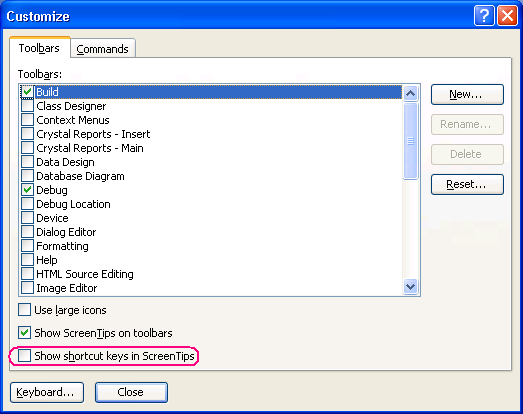
 Right click in the tool bar area --> choose customize, you get the 'Customize' dialog. On the 'Options' tab there's a little check box that says "Show shortcut keys in ScreenTips". Like so:  This is off by default. But you're like me. At least I think you are. And when you spend much of your life inside an application, you want to learn a few good short cut keys. So check that box! Of course, to really take it to the next level, use KeyTraino ;-).
Updated:
Here's the equivalent screenshot for Visual Studio 2005.
'Haacked' on Wed, 18 Oct 2006 22:49:13 GMT, sez: Nice find! That'll come in handy.
'Owen' on Thu, 19 Oct 2006 06:31:43 GMT, sez: Unfortunately there is no options tab in Visual Studio 2005 Team Edition for software developers :( hobbled.
'Arjan' on Thu, 19 Oct 2006 09:53:44 GMT, sez: @Owen: I guess that's a refactoring of Visual Studio :-)
It's right on the Toolbar tab, at the bottom (at least in my Prof. Ed'n)
'Owen' on Thu, 19 Oct 2006 10:47:59 GMT, sez: Oh thanks for the update i found it now :)
so i take it back... although they still hide way too much of the UI in the Team Edition
'Doug' on Thu, 19 Oct 2006 11:55:50 GMT, sez: Amen to that. I just posted a few days ago about how keyboard tricks like these can save you time and frustration and probably the most helpful thing I've ever learned.
http://www.webdev101.com/save-time/most-helpful-thing-i%e2%80%99ve-ever-learned/
'sri' on Fri, 03 Nov 2006 19:53:48 GMT, sez: Some of the useful shortcuts
http://sumtechstuff.blogspot.com/
|