 secretGeek.net
The World's Simplest Code Generator
Are you a programmer? Meet your new best friend.
Update! New version out now: the World's 2nd Simplest Code Generator
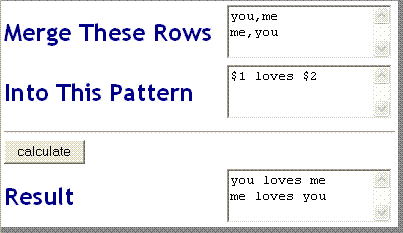
Enter comma separated data into the first box. Type a 'Pattern' into the second box. Press 'Calculate' and Voila! The data and the pattern are merged.
<% 'For Each Item In Request.Form ' Response.Write "Item: " & Item & " Value:" & (Request.Form(Item)) & "" 'next Dim sRows Dim sRowArray Dim sRow Dim sFields Dim sFieldArray Dim sField Dim sTemplate Dim sResponse Dim sReponseLine Dim iFieldNum sRows = Request.Form("TextRows") sTemplate = Request.Form("TextTemplate") if Replace(sRows,"vbcrlf","") = "" then sRows = "me,you" + vbcrlf + "you,me" end if if sTemplate = "" then sTemplate = "$1 loves $2 " + vbcrlf end if sRowArray = Split(sRows, vbCrLf) sResponse = "" Dim iRowNum For each sRow in sRowArray sFieldArray = Split(sRow, ",") iFieldNum = 0 iRowNum = iRowNum + 1 sResponseLine = sTemplate For each sField in sFieldArray iFieldNum = iFieldNum + 1 sResponseLine = Replace(sResponseLine, "$" & iFieldNum, sField) Next sResponse = sResponse & sResponseLine Next %>
If you use this generator, you might find it useful to store your Patterns in the comment area below...
Next → ← PreviousMy book "Choose Your First Product" is available now.
It gives you 4 easy steps to find and validate a humble product idea.