Tip: MS Paint Power User -- Setting Line Thickness
secretGeek .:dot Nuts about dot Net:.
home .: about .: sign up .: sitemap .: secretGeek RSS

Tip: MS Paint Power User -- Setting Line Thickness

Setting Line Thickness for Shapes in MSPaint.exe

[A serious stab at getting the not-so-serious 'MVP for MSPaint' award.]

When annotating a picture with MS-Paint it's handy to use a thick line-style.

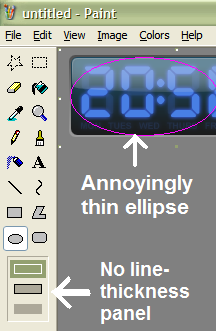
But there is no 'line-thickeness' panel available when drawing ellipses, rectangles, polygons, and rounded rectangles.
[Continues...]

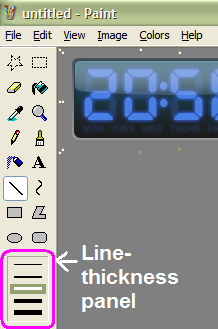
line thickness panel not displayed when using ellipse, for example line thickness panel displayed when using straight line or curve tool

The 'line thickness' panel is only displayed when using the 'straight-line' tool or the curve tool.

Here's the unexpected twist... If you pick a line-thickness while using the 'straight-line' (or curve) tool, then it will be carried over use with the other tools you use, such as rectangles, ellipses, polygons and rounded rectangles.
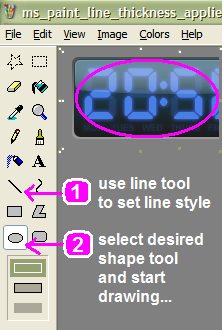
line thickness panel not displayed when using ellipse, for example

If you're not expecting it, this can be an annoyance. But if you know about this behaviour, then it's a big advantage.

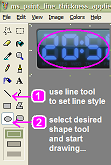
So to draw a thick rectangle, ellipse or other shape:

  1. Select the Straight Line Tool
  2. Adjust to the width you prefer
  3. Then select the shape tool you want (e.g Ellipse)
  4. Go nuts


'Zonker Harris' on Mon, 23 Jan 2006 05:25:36 GMT, sez:

Oh my gosh


'Rice Crispie' on Mon, 23 Jan 2006 06:45:51 GMT, sez:

Dude, that's awesome.


'mike' on Mon, 23 Jan 2006 13:04:40 GMT, sez:

Doesn't everyone know this? ;-)


'leon' on Mon, 23 Jan 2006 20:03:23 GMT, sez:

it's the little things mike!


'pds' on Mon, 23 Jan 2006 23:29:11 GMT, sez:

Tell us how to do a proper conversion to JPG with MS-Paint, and your MVP status will be a lock. In fact, show me how to go from MS Paint to an image embedded in email (WITHOUT bloating the email), JPG or no, and you'll have the MVP, and more important, my heart.


'lb' on Mon, 23 Jan 2006 23:33:32 GMT, sez:

although you *can* save as a 'JPG' with MS-Paint, you have no control over the conversion and you end up with a low quality image.

If you save as PNG you get a much higher quality image (lossless infact) but at a slightly larger size. This is usually pretty good for emails, i reckon.

Also, crop the image down to just the bit you want. This can save big amounts. Use ctrl-W to resize the image quickly.

whaddaya say pds? have i got what it takes to be a most valuable painter?


'pds' on Tue, 24 Jan 2006 00:21:32 GMT, sez:

You've won my heart, I think that's all that really matters. :)


'Farmer Jeb' on Wed, 25 Jan 2006 00:18:51 GMT, sez:

Hey SG. Do you know who this 'pds' is? You've won their heart! (I hope 'pds' is a girl because I happen to know that SG is into p*ssy not c*ck.) Hmmm. Should I not have logged this?


name


website (optional)


enter the word:
 

comment (HTML not allowed)


All viewpoints welcome. But the right to delete any post for any reason is reserved. Don't make me do it. Aim for constructiveness. Comments may be republished, emailed to your loved ones or printed and used as toilet paper. Also, I get particularly nasty on comment spam. It's not worth even trying to post comment spam here -- your html is escaped, and your links are given a rel='nofollow'. By attempting to post a comment, you understand that if the comment is considered spam, at my absolute discretion, your IP address may be used as the target of a prolonged distributed denial of service attack. Your electricity might suddenly stop working. Your car tyres will go mysteriously flat. You will suffer permanent hairloss. Your dreams will be filled with terrifying monsters. And in any case I reserve the right to record and publish your IP address.


TimeSnapper is a life analysis system that stores and plays-back your computer use. It makes timesheet recording a breeze, helps you recover lost work and shows you how to sharpen your act.


NimbleText - FREE text manipulation and data extraction

NimbleText is a Powerful FREE Tool

Use it for:

  • extracting data from text
  • manipulating text
  • generating code

It makes you look awesome. Use it right now! Go on! Hurry! Don't walk, run!


Articles

Just Wally Just Wally
The Correct Order for a First Time Viewing of The Lord Of The Rings The Correct Order for a First Time Viewing of The Lord Of The Rings
A new era for Android. A new era for Android.
Mind-boggling Demo of New Gaming Genre, aka Folder-Based Hangman, aka Fun with Recursion Mind-boggling Demo of New Gaming Genre, aka Folder-Based Hangman, aka Fun with Recursion
Got CSV in your javascript? Use agnes. Got CSV in your javascript? Use agnes.

Archives Complete secretGeek Archives

TimeSnapper -- Automated Screenshot Journal TimeSnapper: automatic screenshot journal
NimbleText -- World's Simplest Code Generator NimbleText: Code Generator, Text Manipulator, Data Extractor

25 steps for building a Micro-ISV 25 steps for building a Micro-ISV
3 minute guides -- babysteps in new technologies: powershell, JSON, watir, F# 3 Minute Guide Series
Universal Troubleshooting checklist Universal Troubleshooting Checklist
Top 10 SecretGeek articles Top 10 SecretGeek articles
ShinyPower (help with Powershell) ShinyPower
Now at CodePlex

Realtime CSS Editor, in a browser RealTime Online CSS Editor
Gradient Maker -- a tool for making background images that blend from one colour to another. Forget photoshop, this is the bomb. Gradient Maker


[powered by Google] 


How to be depressed How to be depressed
You are not inadequate.


Recommended Reading


the little schemer


The Best Software Writing I
The Business Of Software (Eric Sink)

Recommended blogs

Jeff Atwood
Joseph Cooney
Phil Haack
Scott Hanselman
Julia Lerman
Rhys Parry
Joel Pobar
Thomas White
OJ Reeves
Eric Sink

Aggregated Links

proggit
dzone
hacker news
dot net kicks

Human Link Machines

interesting finds
a continuous learner's weblog
arjan's world
weekly link post

LinkedIn profile
LogEnvy - event logs made sexy
Computer, Unlocked. A rapid computer customization resource
PhysioTec, Brisbane Specialist Physiotherapy & Pilates
 
home .: about .: sign up .: sitemap .: secretGeek RSS .: © Leon Bambrick 2003 .: privacy

home .: about .: sign up .: sitemap .: RSS .: © Leon Bambrick 2003 .: privacy