Perfect Productivity with TimeSnapper 2.4
secretGeek .:dot Nuts about dot Net:.
home .: about .: sign up .: sitemap .: secretGeek RSS

Perfect Productivity with TimeSnapper 2.4

TimeSnapper 2.4 now available

TimeSnapper 2.4 is now available. There's two big new features.

First up is the Productivity Calculator. You can now mark certain applications and certain keywords as 'Productive' -- and then keep track of your productivity.

It takes no time to set it up (there's a wizard!) but it's very effective. Because you have a complete record of how you work, you can focus in on the unproductive stuff -- see how it started, how it progressed and how it ended.


TimeSnapper: Productivity Calculator!

This is really powerful stuff. I've learnt a lot about exactly how I personally slack off, and from that I've worked out what techniques will work to keep me in the zone. In the time I've been using the productivity features of TimeSnapper, my ability to stay focused on a task has risen dramatically. Give it a go -- and if the feature doesn't quite suit you, tell us what would work best for you.

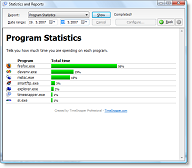
But the biggest new feature is that we now include reports that let you get a quick visual feel of various measurements timesnapper has recorded for you.

Program Statistics Report

We've got five of them in there for starters:

  • Program Stats
  • Productivity
  • Flags
  • Daily Computer Time
  • Disk Space Usage

We'll be adding more in future releases. In the meantime, true hackers can also modify the existing ones, as they are xslt based. (Just backup any files you're modifying, in case you go overboard ;-) ).

Flags Reports

There's numerous other little improvements, and of course some bug fixes. The release notes are here.

Something I've never mentioned before is that TimeSnapper works nicely on Vista. This has been the case since version 2.0 was released. We haven't got an official Microsoft seal of approval on that yet, so I can't put up a "Works On Vista" logo. Try it for yourself.

Thanks to everyone who's provided feedback at the forums, and to people who tried out the private beta builds.

TimeSnapper's really started to achieve the core features that Atli and I originally discussed. There's still a bunch of stuff we haven't gotten around to, and of course version 2.5 is already well underway. New ideas are still welcome. Marketing is the thing we do worst of all -- so any help in that regard is definitely needed.

Best of luck!


'dave solomon' on Sat, 02 Jun 2007 18:45:01 GMT, sez:

That's pretty slick; the functionality reminds me of something I saw in the (awkwardly named OS X app-centric) My Dream App competition, something called "Blossom" ( http://www.getblossom.com/ ). Near as I can figure, you tell it what you should be doing and plants grow and wither on your desktop in response to how much/little productive time you're getting under your belt.
That said, how big a piece of devenv.exe I'm helping myself is a quicker read than how big my sunflowers are.


'Nick' on Sun, 03 Jun 2007 19:56:45 GMT, sez:

Leon, I gotta be honest, the only thing that stops me from buying you app is the fear that it will tell the truth. Don't you have a version that lies to you? Or maybe a popup reminder for when FireFox drops below 50%, like "Dude, you're working too hard. Take a break already!"

On a more serious note, have you considered a PDA version that syncs with the desktop? I don't much about PDA memory limitations these days, but it may be a good way for on the go professionals to track there calls and other PDA activities.


'Magnus Mendelyev' on Sun, 03 Jun 2007 21:11:19 GMT, sez:

LB... sounds like another exciting TimsSnapper installation.

As always, I'll be marketing the app in as many professional circles as I can. Every time I've reviewed previous versions, I've always been impressed.

How does the new efficiency functionality differentiate between effective web surfing in FireFox (like web development forums)and ineffective surfing like (porn downloading)??

MM.


'AtliB' on Mon, 04 Jun 2007 20:57:21 GMT, sez:

Magnus, it is possible by using keywords in the productivity wizard although I prefer using separate browsers for work related (Firefox) and personal (IE) use. Then it's also easier to keep the bookmarks apart.

I also separate personal email (gmail) and work email (Outlook) so I can get a pretty good separation for doing the productivity calculation!


'Dave Markle' on Tue, 05 Jun 2007 18:11:38 GMT, sez:

Leon:

That's the *sickest* thing I have seen in a long while. I can't believe you only have around 10^5 users. (I bought my copy about 5 minutes after installing your demo). IMO this is an absolutely indespensible tool for every consultant.


name


website (optional)


enter the word:
 

comment (HTML not allowed)


All viewpoints welcome. But the right to delete any post for any reason is reserved. Don't make me do it. Aim for constructiveness. Comments may be republished, emailed to your loved ones or printed and used as toilet paper. Also, I get particularly nasty on comment spam. It's not worth even trying to post comment spam here -- your html is escaped, and your links are given a rel='nofollow'. By attempting to post a comment, you understand that if the comment is considered spam, at my absolute discretion, your IP address may be used as the target of a prolonged distributed denial of service attack. Your electricity might suddenly stop working. Your car tyres will go mysteriously flat. You will suffer permanent hairloss. Your dreams will be filled with terrifying monsters. And in any case I reserve the right to record and publish your IP address.


TimeSnapper is a life analysis system that stores and plays-back your computer use. It makes timesheet recording a breeze, helps you recover lost work and shows you how to sharpen your act.


NimbleText - FREE text manipulation and data extraction

NimbleText is a Powerful FREE Tool

Use it for:

  • extracting data from text
  • manipulating text
  • generating code

It makes you look awesome. Use it right now! Go on! Hurry! Don't walk, run!


Articles

Just Wally Just Wally
The Correct Order for a First Time Viewing of The Lord Of The Rings The Correct Order for a First Time Viewing of The Lord Of The Rings
A new era for Android. A new era for Android.
Mind-boggling Demo of New Gaming Genre, aka Folder-Based Hangman, aka Fun with Recursion Mind-boggling Demo of New Gaming Genre, aka Folder-Based Hangman, aka Fun with Recursion
Got CSV in your javascript? Use agnes. Got CSV in your javascript? Use agnes.

Archives Complete secretGeek Archives

TimeSnapper -- Automated Screenshot Journal TimeSnapper: automatic screenshot journal
NimbleText -- World's Simplest Code Generator NimbleText: Code Generator, Text Manipulator, Data Extractor

25 steps for building a Micro-ISV 25 steps for building a Micro-ISV
3 minute guides -- babysteps in new technologies: powershell, JSON, watir, F# 3 Minute Guide Series
Universal Troubleshooting checklist Universal Troubleshooting Checklist
Top 10 SecretGeek articles Top 10 SecretGeek articles
ShinyPower (help with Powershell) ShinyPower
Now at CodePlex

Realtime CSS Editor, in a browser RealTime Online CSS Editor
Gradient Maker -- a tool for making background images that blend from one colour to another. Forget photoshop, this is the bomb. Gradient Maker


[powered by Google] 


How to be depressed How to be depressed
You are not inadequate.


Recommended Reading


the little schemer


The Best Software Writing I
The Business Of Software (Eric Sink)

Recommended blogs

Jeff Atwood
Joseph Cooney
Phil Haack
Scott Hanselman
Julia Lerman
Rhys Parry
Joel Pobar
Thomas White
OJ Reeves
Eric Sink

Aggregated Links

proggit
dzone
hacker news
dot net kicks

Human Link Machines

interesting finds
a continuous learner's weblog
arjan's world
weekly link post

LinkedIn profile
LogEnvy - event logs made sexy
Computer, Unlocked. A rapid computer customization resource
PhysioTec, Brisbane Specialist Physiotherapy & Pilates
 
home .: about .: sign up .: sitemap .: secretGeek RSS .: © Leon Bambrick 2006 .: privacy

home .: about .: sign up .: sitemap .: RSS .: © Leon Bambrick 2006 .: privacy