Setting up email for your microIsv
secretGeek .:dot Nuts about dot Net:.
home .: about .: sign up .: sitemap .: secretGeek RSS

Setting up email for your microIsv

This is one of the simplest things you need to do for your microIsv, but even this one has a few decisions and a few pitfalls. It's also Step 9 of 25 steps for building a microISV.

I've recently gone through the process of getting email in place to support NimbleText, so I thought I'd document it while it's still fresh in the old mind.

The first thing you need to work out is how you intend to use email in your microIsv, and from this you'll determine what accounts you need.

For example, here's where I'm using it, or planning to use it:

  1. When licenses go out
  2. When support requests come in
  3. potentially for 'mass mailouts'

I ruled out 'mass mailouts' but only for now.

To handle these simple cases I could have a whole bunch of addresses such as 'licensing', 'sales', 'support', 'marketing', 'leon', 'ceo' and so on. But that's exactly the sort of over-engineering you need to avoid. In a microIsv you need to be thoroughly minimalist in everything you do.

The simplest thing that can possibly work is to have exactly one account, 'support', so that's what I've done with NimbleText.

create email account

Step 1: Create the account.

I'm hosting my sites at Arvixe these days, so in their control panel I set up a new email account.

I also tell it to forward to my gmail account (this won't be enough to get the forwarding working, we need to tell gmail as well)

I also told it to act as a catch-all address. So if someone writes to 'unknown@...' etc then I should still get it.
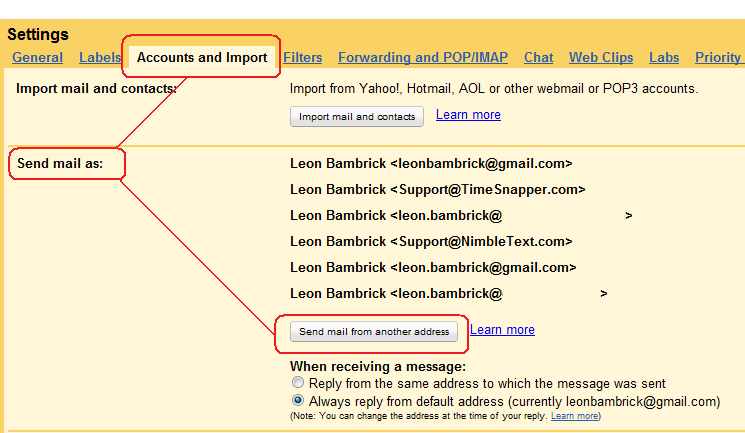
 

send mail as your new account

Step 2: Set up 'send mail as' at gmail.

In gmail you need to configure another account you can send email from.

I seem to 5 or 6 of these in use by now.

Within gmail, you go into settings in the top right hand corner. Choose the tab called called "Accounts and import". In the 'Send mail as' section, click the button to "Send mail from another address."

Enter sensible values, and pick the defaults. To complete this process, gmail sends an email to your new account, that contains a confirmation code you need to enter back in gmail.

Step 3: Create a filter at gmail.

You want any new support requests, etc, to be highlighted, and grouped together.

So create a filter in gmail that applies a new label, named after your microIsv. Tip: for any label I really care about, such as this one, I pre-pend the name with an underscore so it is alphabetically near the top of my labels. (I have a lot of labels). In this case the label is "_NimbleText".

I also tell the filter to apply a star to all emails from my support address. I can leave the star in place until a support request has been followed up sufficiently. I treat anything with a 'star' as an open case.

(Yes, this is a poor man's bug tracking system. The startup package from fogBugz is free and powerful. I assume Atlassian's Jira has a similar deal.)
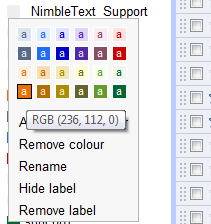
 

color the label you created

Step 4: Color the label.

Once the filter is created and the label is created we can then set a color for the filter, so that any new support messages stand out in the inbox.

Step 5: Listing email address online

Now you need to list the email address in a couple of places. I've put it on the about page, the help page and the purchase page.

I was *particularly* pleased with the idea of putting the email address on the purchase page, as I think it's just the kind of reassurance which might help people make the leap of faith required to put your money in the hands of a stranger.

Step 6: List email address in your application

Stupid me hasn't done this yet.

It's a good idea to make your email address available from the help menu of your application -- perhaps two links, one for 'add a suggestion ;-)' and one for 'report a report :-('.

Also, when the app crashes *hard*, your real clever applications catch the otherwise unhandled exception, and encourage the user to send them to the support address.

A more sophisticated approach is to send the crash reports over http. If you're integrated with Fogbugz, as we are with TimeSnapper, then you can use their 'bugzscout' dll to deliver crash reports, with customer permission. (also, here's an interesting codeproject article from 2004 on handling exceptions by some weird unknown guy called Wumpus1)
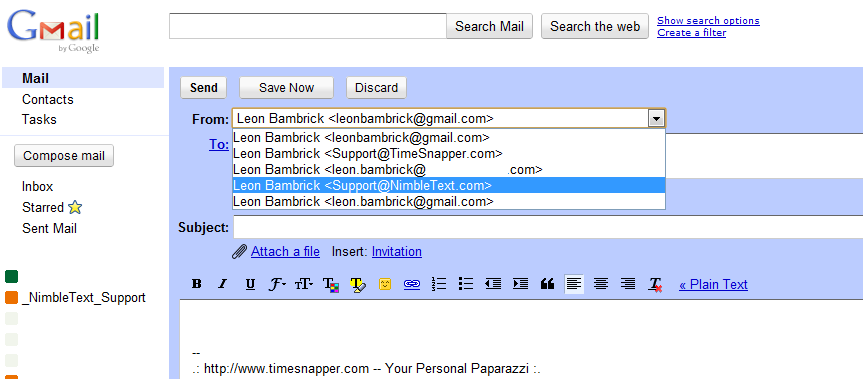
 

pick correct from-address when sending

Step 7: When sending, pick correct 'from' address

This is pretty self-explanatory. If you're sending an email in your capacity as CEO of your new microIsv, pick the relevant email address in the 'from' drop-down list, rather than your regular email address.

Step 8: Sending email programmatically.

At times you'll need to send one or two emails programatically. For example when a purchase occurs and you want to send out a license.

You don't want those emails to be categorised as spam. There's a bunch of things to keep in mind, head to stackoverflow to read more.

When performing mass mailouts it becomes much more difficult to avoid being classified as spam (even if you're not sending spam) so when I've done that in the past I've outsourced it to a specialist company. I've used Campaign Monitor and was seriously impressed by the whole experience. I'd recommend you use them for any bulk promotional emails you need to send. (No, I'm not affiliated with them.)

Wrap it up already

That's it. That's every detail I can think of for getting email up and running to suit the tiniest of enterprises.

Comments, suggestions, feedback, bring it.


'Leonardo Cortez' on Tue, 08 Mar 2011 02:44:14 GMT, sez:

Excellent post, as usual.

Just one comment: On step 2, when setting up the account on gmail, you are asked if you want to send messages ‘through Gmail’ or ‘through domainName.com SMTP servers’. If you select the first one, emails you send will have in the From field something like: "example@gmail.com on behalf of John Doe [support@example.com]"

So your primary gmail account is still visible. If you don’t want that, make sure you select the second option on the account configuration page.


'lb' on Wed, 09 Mar 2011 03:11:49 GMT, sez:

@Leonardo
You're so right. This is exactly how I've set it up and I have this problem. I'll have to set it up to use NimbleText's SMTP servers, and verify that -- then update the article.

It's a yucky mistake too as I wasn't aware that my outgoing emails looked like that.


'Baptism Gifts' on Thu, 09 Feb 2012 12:53:38 GMT, sez:

Most people find it difficult to choose the best christening gifts for babies because they often think about choosing what the parents will like and not what befits the baby. You therefore need to choose a unique gift because parents often appreciate it when you give them a gift that can help the child to grow psychologically, emotionally , physically and mentally. Don’t just give a gift that will only be disposed off after a certain period of time when it became useless.


name


website (optional)


enter the word:
 

comment (HTML not allowed)


All viewpoints welcome. But the right to delete any post for any reason is reserved. Don't make me do it. Aim for constructiveness. Comments may be republished, emailed to your loved ones or printed and used as toilet paper. Also, I get particularly nasty on comment spam. It's not worth even trying to post comment spam here -- your html is escaped, and your links are given a rel='nofollow'. By attempting to post a comment, you understand that if the comment is considered spam, at my absolute discretion, your IP address may be used as the target of a prolonged distributed denial of service attack. Your electricity might suddenly stop working. Your car tyres will go mysteriously flat. You will suffer permanent hairloss. Your dreams will be filled with terrifying monsters. And in any case I reserve the right to record and publish your IP address.


TimeSnapper is a life analysis system that stores and plays-back your computer use. It makes timesheet recording a breeze, helps you recover lost work and shows you how to sharpen your act.


NimbleText - FREE text manipulation and data extraction

NimbleText is a Powerful FREE Tool

Use it for:

  • extracting data from text
  • manipulating text
  • generating code

It makes you look awesome. Use it right now! Go on! Hurry! Don't walk, run!


Articles

Mind-boggling Demo of New Gaming Genre, aka Folder-Based Hangman, aka Fun with Recursion Mind-boggling Demo of New Gaming Genre, aka Folder-Based Hangman, aka Fun with Recursion
Got CSV in your javascript? Use agnes. Got CSV in your javascript? Use agnes.
I went to write down a book name and founded an internet empire instead. I went to write down a book name and founded an internet empire instead.
NimbleText: Origins NimbleText: Origins
The Windows 8 Mullet The Windows 8 Mullet
Cosby: spontaneous striped background generator Cosby: spontaneous striped background generator
Slides from WDCNZ: Live Coding Asp.net MVC3 Slides from WDCNZ: Live Coding Asp.net MVC3
MVC 3, MVC 3, "Third Times a Charm" references
Custom Errors in ASP.Net MVC: It couldn't be simpler, right? Custom Errors in ASP.Net MVC: It couldn't be simpler, right?
Anatomy of a Domain Hijacking, part 2: The Website Who Came In From The Cold Anatomy of a Domain Hijacking, part 2: The Website Who Came In From The Cold
Anatomy of a Domain Hijacking, part 1 Anatomy of a Domain Hijacking, part 1
secretGeek.net domain has been stolen. The site may go down. secretGeek.net domain has been stolen. The site may go down.
Boring article: 'untrusted domain' issue with SQL Server. Boring article: 'untrusted domain' issue with SQL Server.
Coding While You Commute Coding While You Commute
Test Driven Dentistry Is A Good Thing Test Driven Dentistry Is A Good Thing
The 'less crashy' release of NimbleText The 'less crashy' release of NimbleText
Rethinking Toolbars in Visual Studio (or any IDE) Rethinking Toolbars in Visual Studio (or any IDE)
Where shall we have lunch? Where shall we have lunch?
Setting up email for your microIsv Setting up email for your microIsv
The NO Visual Studio movement: Compiling .net projects in Notepad++ The NO Visual Studio movement: Compiling .net projects in Notepad++
ZeroOne: the editor for programmers who think in binary ZeroOne: the editor for programmers who think in binary
Mercurial workflow for personal projects (with a .net bias) Mercurial workflow for personal projects (with a .net bias)
I see you're using vim. Let me fix that for you. I see you're using vim. Let me fix that for you.
The worst recruitment spam I've ever read The worst recruitment spam I've ever read
A thank you I forgot to say A thank you I forgot to say
My new product, NimbleText, is live My new product, NimbleText, is live
Grabbing the free songs of Jonathan Coulton (with Powershell) Grabbing the free songs of Jonathan Coulton (with Powershell)
Using NimbleSet to compare lists Using NimbleSet to compare lists
Wanted: Wiki Lists (dot org) Wanted: Wiki Lists (dot org)
DOS on Dope: The last MVC web framework you'll ever need DOS on Dope: The last MVC web framework you'll ever need
JSON Query Languages: 5 special purpose editors JSON Query Languages: 5 special purpose editors
What then, is b? What then, is b?
SQLike: A simple editor SQLike: A simple editor
Yet Another BizPlan Generator. Yet Another BizPlan Generator.
HOT GUIDS: A hot or not site for guids HOT GUIDS: A hot or not site for guids
How does life get better? One tiny hack at a time. How does life get better? One tiny hack at a time.
24 things to do, and 100 things *not* to do (yet) for building a MicroISV 24 things to do, and 100 things *not* to do (yet) for building a MicroISV
Venture capital won't kill Jeff Atwood, it will only make him Jeffer. Venture capital won't kill Jeff Atwood, it will only make him Jeffer.
A handy workflow image for newbie mercurial users A handy workflow image for newbie mercurial users
Fractal Feedback, a diversion into recreational programming Fractal Feedback, a diversion into recreational programming
Hump-Jumping: How the Education of Computer Science can be Saved, err, maybe. Hump-Jumping: How the Education of Computer Science can be Saved, err, maybe.
Suggested User Experience Improvements for DiffMerge Suggested User Experience Improvements for DiffMerge
SQL Style Extensions for C# SQL Style Extensions for C#
The Movie Hollywood (And My Wife) Doesn't Want You To See: Weekend at Jacko's The Movie Hollywood (And My Wife) Doesn't Want You To See: Weekend at Jacko's
Sysi: the ultimate administrators toolkit Sysi: the ultimate administrators toolkit

Archives .: secretGeek :: Complete Archives
TimeSnapper -- Automated Screenshot Journal TimeSnapper.com    
Version 3.3: true productivity boost

Next Action NextAction
Managing the top of your mind

NimbleText -- World's Simplest Code GeneratorNimbleText -- World's Simplest Code Generator, Text Manipulator, Data Extractor

25 steps for building a Micro-ISV 25 steps for building a Micro-ISV
3 minute guides -- babysteps in new technologies: powershell, JSON, watir, F# 3 Minute Guide Series
Universal Troubleshooting checklist Universal Troubleshooting Checklist
Top 10 SecretGeek articles Top 10 SecretGeek articles
ShinyPower (help with Powershell) ShinyPower
Now at CodePlex

Realtime CSS Editor, in a browser RealTime Online CSS Editor
Gradient Maker -- a tool for making background images that blend from one colour to another. Forget photoshop, this is the bomb. Gradient Maker


[powered by Google] 


How to be depressed How to be depressed
You are not inadequate.


Recommended Reading


the little schemer


The Best Software Writing I
The Business Of Software (Eric Sink)

Recommended blogs

Jeff Atwood
Joseph Cooney
Phil Haack
Scott Hanselman
Julia Lerman
Rhys Parry
Joel Pobar
Thomas White
OJ Reeves
Eric Sink

Aggregated Links

proggit
dzone
hacker news
dot net kicks

Human Link Machines

interesting finds
a continuous learner's weblog
arjan's world
weekly link post

LinkedIn profile
LogEnvy - event logs made sexy
Computer, Unlocked. A rapid computer customization resource
PC Smart Buys - Computer Hardware in Australia
 
home .: about .: sign up .: sitemap .: secretGeek RSS .: © Leon Bambrick 2006 .: privacy

home .: about .: sign up .: sitemap .: RSS .: © Leon Bambrick 2006 .: privacy